
 Status Monitoring

Purpose
You can monitor the status of the RFC connections by choosing Landscape: Connectivity à RFC/Current. The upper half of the window provides an overview of all RFC connections. The lower half of the window displays details of one RFC connection.
Prerequisites
You have configured the RFC connection (see Initially Configuring the RFC Connection).
Process Flow
...
1. Choose Landscape: Connectivity à RFC/Current and then the Connect Admin Tool function.
If the system fails to connect to an SAP system, the Connection Status column displays an error message. The configuration status is not displayed, not even for the SAP systems that the TREX admin tool is connected to.
2. If there are errors during connection: Try to solve the cause of the errors.
For more information, see Connection Errors.
3. If the system connected successfully: Check the status of the RFC configuration. There are the following statuses:
Configuration Status |
Meaning |
|
The RFC configuration is correct. |
|
The RFC configuration contains errors. |


 red
red4. If there are configuration errors: Try to solve the cause of the errors.
For more information, see Configuration Errors.
5. If necessary, you can display the details of an RFC connection.
The graphic below presents the structure of the lower half of the window:
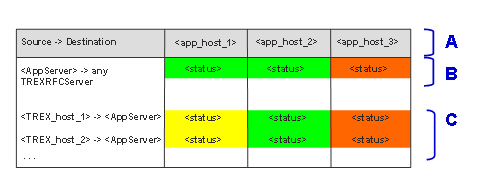
Explanation of the screen areas:
Table Area |
Content |
A (title row) |
SAP system application server Each table column corresponds to one application server. |
B (upper half of the table) |
Connection status from application server perspective. You can identify the following here: ● Do all application servers have a connection to the TREX system? ● Which SAP gateway is used for the connection? ● How much time is required for the connection? |
C (lower half of the table) |
Connection status from TREX host perspective. You can identify the following here: ● Do all TREX hosts have a connection to the application servers? ● Which SAP gateway is used for the connection? In the case of a single host system, this area contains one row. In the case of a distributed system, this area contains a row for each TREX host. |