 Determining the Recipient of Status Notifications by BAdI
In the context of a marketing campaign, all parties involved can be sent mails informing them of changes in the status of marketing elements (for example, approval of a campaign). To find out which business partners are affected by this you can use the method STATUS_CHANGE of BAdI BAdI CRM_MKTPL.
Integration
This function is part of the function for sending status notifications. For more information, see Notification of Marketing Element Status Changes.
Prerequisites
The implementation of the BAdI CRM_MKTPL must contain the same code in the method STATUS_CHANGE as delivered in the implementation /SPL/CRM_MKTPL_EXM (class /SPL/CL_IM_CRM_MKTPL_EXM). For this, the standard code from the BAdI implementation /SPL/CRM_MKTPL_EXM should be copied to the active BAdI implementation.
Features
You can implement status-dependent partner determination by using the method STATUS_CHANGE. With this, the following steps are performed:
Determination of product categories for all assigned products
The corresponding product category is determined for the products assigned in the Products
tab page. If two product categories are assigned, the search is carried out for both product categories.
Determination of the business partners (including partner functions) for the product
Using the determined product categories, the business partners need to be determined and copied to the tab page Partner
. To enable this, the assignments chosen in the transaction Maintain Person Responsible for Product Categories
are evaluated. If organizational units and positions are assigned in this transaction, the associated business partners are determined.
Searches
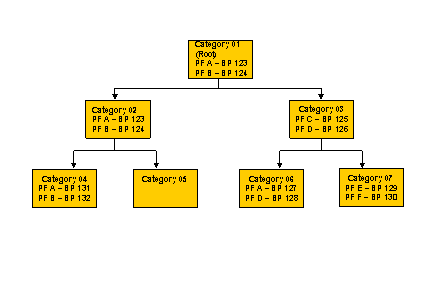
Since not all partner functions are maintained for each product category, the following search strategies are implemented:
Search by assignment of organizational unit/position/business partner directly in the relevant product category with subsequent selection of all determined business partners
Search by assignment of organizational unit/position/business partner in the higher-level product category with subsequent selection of all organizational units, positions, business partners assigned a different partner function from the one previously determined
Repeat of the previous search for all nodes up to the highest category node in the product category. As soon as business partners have been determined for all partner functions defined in the partner determination procedure, the search is no longer continued on the higher levels.
Insertion of partners on the Partners tab page
The determined business partners and their partner functions are entered on the tab page Partners
.
Category | Partner Functions Determined | Business Partners Determined |
Category 04 | A B | 131 132 |
Category 05 | A B | 123 124 |
Category 06 | A D C B | 127 128 125 124 |
Category 07 | E F C D A B | 129 130 125 126 123 124 |