
 Layout Basics

The layout specifies the arrangement of the UI elements in their UIElementContainer. An object of the type Layout must be added to each container. To each child object contained in this container, an appropriate object of the type LayoutData must be added. This LayoutData object specifies the layout properties of the corresponding child in the container - for example, the position in a coordinate system defined by the layout.
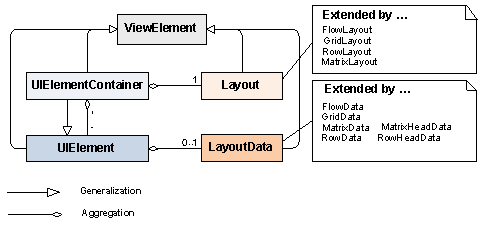
Each UI element container aggregates a corresponding layout object that describes how the inserted UI element children are assigned within the container. This type of layout object is a subclass of the abstract base class Layout.
The following layout UI elements are available for arranging the UI elements in a view:
● FlowLayoutsapurl_link_0002_0003_0009
A FlowLayout sequentially arranges the container children. This means that you cannot describe defined line breaks, for example. A FlowLayout depends on the client technology and the size of the browser window.
● MatrixLayoutsapurl_link_0002_0004_0009
A MatrixLayout arranges the container children in a tabular format. You can use the properties stretchedHorizontally and stretchedVertically to specify whether or not the UI elements match the container size. You cannot explicitly define the number of columns, for example, which you can do when using the GridLayout. Instead you assign a MatrixHeadData object to a UI element so this UI element is wrapped. It is a great advantage of the MatrixLayout over the GridLayout that you can easily create consistent layout structures using the provided cell classes.
● RowLayoutsapurl_link_0002_0006_0009
A RowLayout has a similar behavior to the MatrixLayout. However, it sequentially assigns the UI elements to exactly one column. If you assign a RowHeadData to a UI element, it is exactly this UI element that is wrapped. It is a great advantage of the RowLayout that you can easily create consistent layout structures using the predefined cell classes, which are also provided in the MatrixLayout.
● GridLayoutsapurl_link_0002_0008_0009

Instead of the GridLayout, use the MatrixLayout whenever possible.
A GridLayout arranges the container children in a two-dimensional grid with a defined column number and any number of rows. Line breaks can be defined. Line breaks are automatically inserted when a UI element is too long to be displayed within one row.

For dynamic programs you can use CL_WD_DYNAMIC_TOOL->CREATE_LAYOUT_DATA to create the correct layout data for a UI element.
This occurs (almost) automatically in the ABAP Workbench in the View Designer.