
 Maintaining Calculation Processes
Purpose
The corporate administrator within your organization uses the portal pole CRM Administrator to provide administrator maintenance support for:
· Batch requests
· Schedule and forecast calculations
· The calculation server
Process Flow
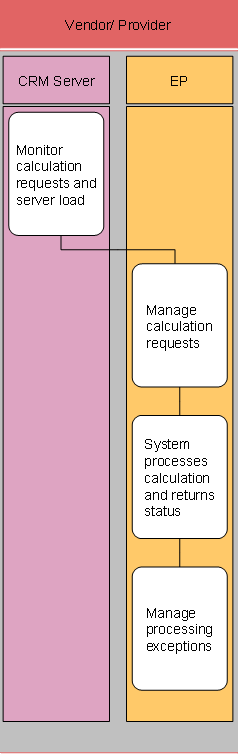
...
1. Monitor calculation requests and server load (SAP CRM)
The corporate administrator monitors the calculation requests and server load through the calculation services page accessed through the CRM administrator portal by selecting Workforce CRM Admin ® WFM CS Administration ® Server Administrator ® Calculation Services.
2. Manage calculation requests (EP)
The corporate administrator manages calculation requests through the calculation services page accessed through the CRM administrator portal by selecting Workforce CRM Admin ® WFM CS Administration ® Server Administrator ® Requests.
3. System processes calculation and returns status (EP)
The system processes calculation requests launched either by location managers through the store manager’s portal or by corporate manager through batch processing.
¡ A location manager launches schedule and forecast calculation requests.
Calculation Request |
Choose |
Schedule |
Workforce Deployment ® Schedules ® Calculations ® Calculate Schedule and then choosing Submit to Calculate |
Forecast |
Workforce Deployment ® Forecasts ® Forecasting Parameters and then choosing Submit Forecast Workforce Deployment ® Forecasts ® View/Modify Forecast and then choosing Update Forecast |
The location manager views the calculation status by selecting Workforce Deployment ® Schedules ® Calculations ® Status.
¡ Corporate managers launch schedule and forecast calculation requests through the SAP Easy Access menu by navigating to SAP Menu ® Industries ® Retail ® Retail Multisite Workforce Deployment ® Global Settings ® Define Calculation Batches and uses the Batch Requests page to manage batch schedule or forecasting requests that have not yet been submitted for processing.
4. Manage processing exceptions (EP)
The corporate administrator processes calculation exceptions by choosing Workforce CRM Admin ® WFM CS Administration ® Server Administrator and then choosing the:
¡ Requests page to:
§ View the status of pending, in-process, and recently completed requests for schedule and forecast calculations.
§ Perform the following actions on pending and in-process requests:
· Suspend
· Cancel
· Resume
· Change Priority
¡ Solutions page to:
§ View segmented requests. The system can break down complex requests into multiple problems, in order to process them more efficiently. After the system completes processing, these segmented solutions are consolidated, regenerating the original request.
§ Troubleshoot when the connection between the Application Server and Calculation Server seems to have been interrupted due to portions of the solution not being completed successfully.
The technical administrator should also refer to the error log to determine the source of the error.