
 Incentive Results Reporting
Purpose
You use this business process to view commission and incentive reports through either the Sales Manger Portal or Sales Representative Portal:
· Sales Manager Portal:
¡ My Team: Sales and Commissions
¡ Closed Deals per Sales Office or Representative
¡ Outperformers/Subperformers: MTD Commissions
¡ Outperformers/Subperformers: YTD Commissions
¡ My Closed Deals
¡ My Sales and Commissions
· Sales Representative Portal:
¡ My Closed Deals
¡ My Sales and Commissions
Process Flow
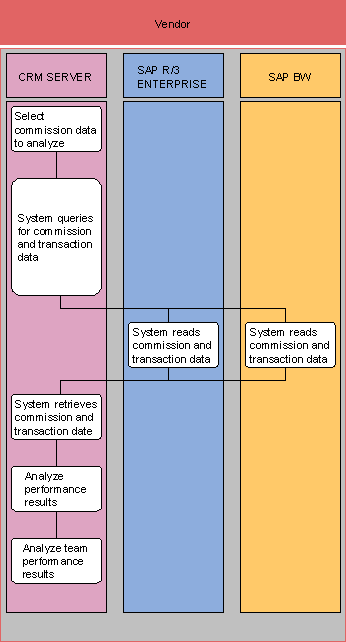
...
1. Select commission data to analyze (SAP CRM)
Depending upon your role, you enter a request for a CRM-ICM report via either the Sales Manager Portal or Sales Representative Portal.
2. System queries for commission and transaction data (SAP CRM)
The system validates your request and queries the appropriate system(s).
3. System reads commission and transaction data (SAP R/3)
The system locates the data based on your request.
4. System reads commission and transaction data (SAP BW)
The system locates the data based on your request.
5. System retrieves commission and transaction data (SAP CRM)
The system retrieves the data and organizes it for viewing using the appropriate report format. Some of the reports utilize information stored in SAP BW, others utilize information stored in both SAP CRM and in the ICM application.
6. Analyze performance results (SAP CRM)
You view the data within the portal or print the data as a report on your own sales performance.
7. Analyze team performance results (SAP CRM)
When in the role of a Sales Manager, you view the data within the portal or print the data as a report on your team’s performance.