
 Entering and Reviewing Employee
Requests
Entering and Reviewing Employee
Requests 
Purpose
Using employee self service functions, employees can enter changes to their own data. Once in the system, managers review the changes to ensure that the changes meet corporate requirements.
This process step is optional. When not used, employees communicate requests and managers enter and review them through standard processes.
Prerequisites
You have enabled employee self service functions from HCMallowing employees to make changes to their own data directly into the system.
Process Flow
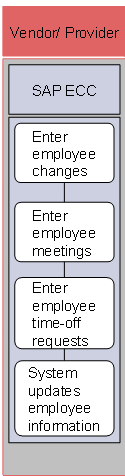
The following process takes place in SAP ECC.
1. Enter employee changes
Employees enter changes to their own scheduling specific data, such as changes to their availabilities or preferences. Once in the system, managers review the changes and determine whether they will accept or reject them prior to updating the system.
2. Enter employee meetings
Employees enter meeting requests. Once in the system, managers review the requests and accept or reject them prior to updating the system.
3. Enter time-off requests
Employees enter time-off requests. Once in the system, managers review the requests and accept or reject them prior to updating the system.
4. System updates employee information
The system updates all approved employee requests and changes.