
 Partial Replication

Use
You use this function to restrict the replication of business partners from a sender system to a receiver system. In other words, the receiver system does not automatically post all business partners sent to it.
You can control partial replication using Business Partner Roles. You can define Role Categories in the Customizing for the receiver system. Inbound business partner messages have to contain one of these role categories before they can be posted in the receiver system.
Integration
Partial replication is part of the BusinessPartnerReplication integration scenario in the Integration Repository for the SAP NetWeaver Exchange Infrastructure (XI).
Both the Message Interfaces BusinessPartnerDetailSendRequestOut (Outbound) and BusinessPartnerDetailSendRequestIn (Inbound) are used for this function.
For more information, see the SAP Library by choosing SAP NetWeaver ® Process Integration ® SAP Exchange Infrastructure.
Prerequisites
You have carried out the following IMG activities in the Customizing for the SAP Business Partner for Financial Services by choosing Settings for Financial Services ® Interfaces/Data Exchange ® Data Replication:
· Activate Function Modules
You have activated the function module FS_CHECK_DIST_CRITERIA_ROLE.

This function module has to be processed at the event CRMIN (CRM inbound) before the function module BUPA_INBOUND_MAIN_CENTRAL(inbound for the general business partner data) is processed.
You can activate or deactivate only the defined function modules in this IMG activity. If you want to add further entries, choose the transaction CRMC_BUT_CALL_FU.
· Define BP Role Categories for Partial Replication
You have defined the role categories for the business partner that you want to post when the data enters your system.
For more information, see the documentation for the IMG activities.
Scope of Functions
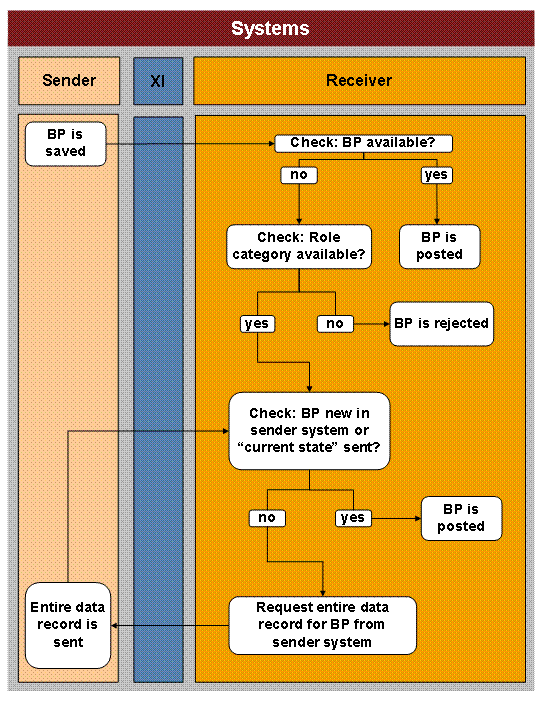
When you create or change a business partner in the sender system, the activity Save Business Partner triggers the outbound. If the outbound is active in the sender system, then the information about the new or changed business partner is replicated to one or several receiver systems via XI in the form of an XML message.
In the receiver system the function module FS_CHECK_DIST_CRITERIA_ROLE carries out the following steps:
· If the business partner is already available in the receiver system, the inbound is executed and the changes to the business partner are posted in the receiver system.
· If the business partner is not yet available in the receiver system, the system checks whether the inbound message contains a role category that is defined in Customizing.
¡ If the message does not contain a role category that has been defined, then the receiver system rejects the business partner, that is to say it is not posted.
¡ If the message contains a role category that has been defined, then the system carries out the following steps depending on what is contained in the message:
§ If the business partner has been created in the sender system, the inbound is executed and the business partner is posted in the receiver system.
§ If the business partner was already available in the sender system and changed there, the message contains only the information that has been changed and not the entire business partner (delta replication). The inbound is not executed.
The receiver system sends a request to the sender system via the BusinessPartnerDetailSendRequestOut message interface. The sender system sends the entire business partner (“current state”) to the receiver system.
The inbound is executed and the business partner is posted in the receiver system.
If a time-dependent change is made in the sender system, then the reaction in
the receiver system depends on the time dependency settings. For more
information about time dependency, see
 Time Dependency of
Central Data.
Time Dependency of
Central Data.
For more information, see the documentation for the function module in the system.
Example
You have a CRM system with application systems A and B connected to this system. The CRM system is the leading system in which business partners are created and changed, and replicated to the application systems.
All business partners created in the CRM system are to be replicated to system A. If you do not activate the function module FS_CHECK_CRITERIA_ROLE in this system, then the data is replicated.
Only business partners belonging to the role category Customer are to be replicated to system B. If you activate the function module FS_CHECK_CRITERIA_ROLE and define the role category Customer in this system, then only business partners with this role category are posted in the system. All other business partners are rejected.