
 Scheduling with Schedule Track
Purpose
Schedule track gives corporate a means to control the scheduling steps managers perform at each location by defining:
· The pages displayed in the manager’s portal
· The order in which the system displays the pages
When using schedule track, managers must move through the schedule process as defined during installation.
This process step is optional. When not using schedule track, managers access all portal pages through standard processing.
Prerequisites
You have defined the schedule process you want your managers to follow by choosing the path:
SAP IMG ® Customer Relationship Management ® Workforce Deployment ® Retail and Interaction Center Workforce Deployment ® Global Settings ® Define Schedule Track
Process Flow
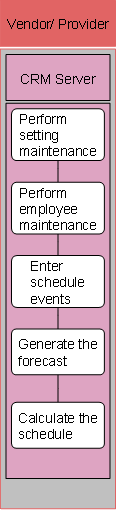
The following process takes place in SAP CRM.
1. Perform setting maintenance
With access to the Settings pages, managers make any setting changes required for this schedule week.
2. Perform employee maintenance
With access to the Employees pages, managers make any employee maintenance changes required for this schedule week.
3. Enter schedule events
With access to the Events page, managers make any schedule event changes required for this schedule week.
4. Generate the forecast
With access to the Forecast pages, managers go through the process of generating a forecast for this schedule week.
5. Calculate the schedule
With access to the Schedule pages, managers complete the process of generating a schedule for this schedule week.