
 Managing Workforce within Interaction Center
Purpose
You use this business process to create and maintain interaction center agent schedules within SAP CRM through SAP Enterprise Portals. The system utilizes business variables entered during implementation and actual channel data either captured directly from your telephony equipment or entered as batch data as input to scheduling. Using this information, the system provides flexible forecasting which:
· Allows you to model your interaction center work to create a forecast that best represents your actual requirements.
· Enables you to effectively align interaction center strategy with the goals of the corporation, the expectations of customers, and the career needs of agents.
The “optimization engine” at the heart of the system then uses the forecast to calculate the best possible floor schedule while balancing such weighted variables as staffing needs, employee skill levels, payroll requirements, service level objectives, employee availabilities, workplace rules and performance standards. The result – scheduling is transformed from a necessary, tedious, clerical function into an analytical, cost-effective, business management process.
Process Flow
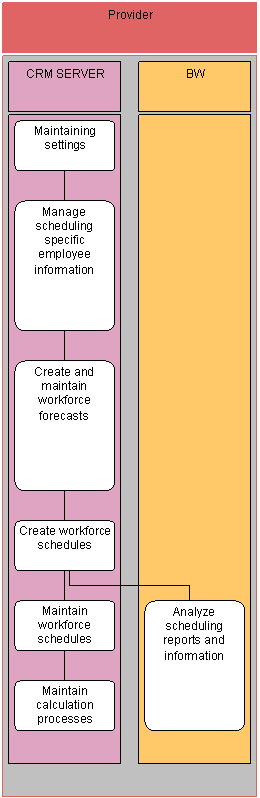
1. Maintaining settings (SAP CRM)
Following implementation, you change specific settings for a single location or multiple locations to account for such events as:
¡ Changes to operating hours for a specific location
¡ Additional tasks created for a single location or for all locations
¡ Core scheduling changes for a specific week
2. Manage scheduling specific employee information (SAP CRM)
You use this step to:
¡ Add employees to the system so that you can include them when you next calculate schedules
¡ Maintain the permanent data for an agent once added to the system
¡ Remove employees from the system when they are no longer part of your organization
3. Create and maintain workforce forecasts (SAP CRM)
You create a forecast to calculate your expected overall business volume and workload. The process uses your activity together with parameters and other historical information to establish trends. You then have the opportunity to tune this data to ensure that it accurately reflects the current business situation. Once the volume forecast is generated, it projects the workload, the number of employees needed per work area for each quarter hour.
4. Create workforce schedules (SAP CRM)
You create a schedule to produce a workforce plan for your location for a specific week. The schedule lists out when each of your agents:
¡ Works in a specific work area
¡ Takes a break or have a meal
¡ Are assigned other schedule events, such as to training or attend a meeting
In most organizations, you calculate your schedule from one to two weeks in advance of the actual schedule date.
5. Maintain workforce schedules (SAP CRM)
Schedules are typically calculated from one to two weeks prior to the actual schedule date. The goal of maintaining workforce schedules is to keep the schedule up-to-date based on the most current information available. You maintain a calculated schedule to:
¡ Ensure it meets all workload and coverage requirements using the “freshest“ forecast data
¡ Update employee information to account for unplanned agent changes
¡ Account for business changes not reflected in the original schedule
6. Analyze schedule reports and information (SAP NetWeaver)
Reports within the system provide administrative and management support for your location. All reports are created through SAP BW and are accessible through the IC Manger’s portal.
7. Maintain calculation processes (SAP CRM)
The corporate administrator within your organization uses the Portal Role CRM Administrator to provide administrator maintenance support for:
¡ Batch requests
¡ Schedule and forecast calculations
¡ The calculation server
Result
You have scheduled agents within your Interaction Center.