
 IT Help Desk

Purpose
You can use this business process to enable:
· Customers to report issues conveniently across multiple communication channels such as telephone, e-mail, chat, and fax
· IT help desk agents to subsequently manage and coordinate issues in an efficient and homogeneous way
Issues can include handling complaints, processing service tickets, resolving inquiries, technical training, knowledge management, selling service products, and managing assets. Agents can either resolve issues directly with the support of knowledge management tools, or escalate them to different support levels manually or automatically, ensuring all follow-up activities are tracked to closure. Agents can ensure resolution time adherence by automatically determining contractual service level agreements (SLA) by department.
· Service organization managers, including the interaction center manager, to control and increase the service quality level of their organization by using monitoring tools
Process Flow
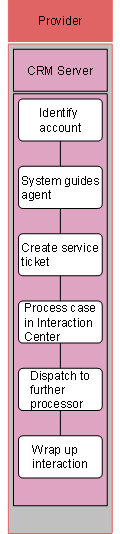
...
The following business process runs in SAP CRM:
1. Identify account
For information about this business process step, see Information Help Desk.
2. System guides agent
For information about this business process step, see Information Help Desk.
3. Create service ticket
This business process step runs only in the Interaction Center WebClient.
To track an issue and its resolution, the agent creates a service ticket. Based on the priority entered and the response profile for this customer’s service contract, major milestones are determined automatically, such as the time for providing an initial response to the customer, and the time for completing the service ticket. This ensures that all processors involved in resolving the issue are informed of the time frame for meeting the company’s service quality level objectives. It also enables the service organization manager to monitor any late tickets and to create statistics to compare the actual service quality level to the target one.
4. Dispatch to further processor
If the agent is unable to solve the issue, the agent can forward it to a further processor, for example, the first-level local support organization. Besides this manual routing procedure, you can set up an automatic routing procedure according to freely definable rules based on service ticket information.
If the issue cannot be resolved by the first-level local support organization, the service ticket can again be dispatched to a further support level, and so on.
Once the issue is resolved, the current support level employee can close the ticket and send the solution to the customer, or return the ticket to local support to provide the solution to the customer.
5. Wrap up interaction
For information about this business process step, see Information Help Desk.