 Fund Determination
Fund determination is used to assign the appropriate funds to:
Trade promotions
Reservations for market development funds (MDF) initiatives and MDF claims
Claims
Budget postings
Prerequisites
You have made the settings in Customizing for Customer Relationship Management under:
 Funds Management
  Fund Determination Define Fund Determination Profiles
- Trade Promotion Management Trade Promotions Funds Integration Define Settings for Funds Integration
- Claims Management Fund Determination
- Funds Management Budget Postings Fund Determination
Features
Fund determination is based on the evaluation of certain match criteria that are defined in the fund determination profiles in Customizing. Fund determination varies from one scenario to another. For each fund determination profile, you can make settings for the following match criteria:
Organizational data
Territory hierarchy
Account hierarchy
You can use bottom-up fund determination to distribute budget to accounts further up in the account hierarchy. Fund determination searches for funds that are assigned to the same account hierarchy node level and to all levels up in the account hierarchy.
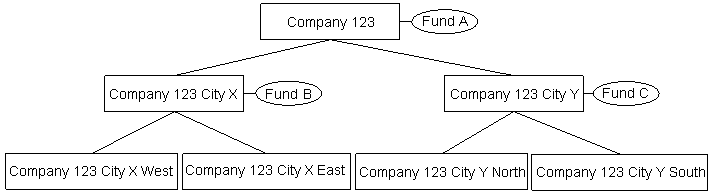
You can use top-down fund determination to distribute budget to subaccounts in the account hierarchy, for example, in budget transfers. Fund determination searches for funds that are assigned to the same account hierarchy node level and to a specific account hierarchy node level further down in the account hierarchy.
 Example
If you want to transfer budget from Fund A assigned to Company 123, fund determination must determine the funds for the subaccounts, such as Fund B assigned to Company 123 City X, Fund C assigned to Company 123 City Y, and so on.
 End of the example.
Product hierarchy
You can use bottom-up fund determination to distribute budget to product categories further up in the product hierarchy. Fund determination searches for funds that are assigned to the same product category and to all levels up in the product hierarchy.
In addition, the calling application can provide data about:
Funds plan
Fund status
Expense type
You assign fund determination profiles to transactions in Customizing. The fund determination profile, which you have assigned to the transaction, is used in fund determination.
Fund Determination for Trade Promotions
In fund determination for trade promotions, the system searches for all funds that are assigned to the funds plan of the trade promotion and that have the status Released. Then it filters the funds based on the organizational data, territory, account, product, and expense type of the trade promotion. If there is more than one fund available, you can select the fund you want using the input help.
For more information, see Funds Integration.
Fund Determination for Reservations for MDF Initiatives and MDF Claims
Fund determination for reservations for MDF initiatives and MDF claims is based on Access Control Engine (ACE) visibility. ACE controls the access rights of channel partners to MDFs and the activities that the channel partners can perform. Channel partners:
Can only access their own funded initiatives and not those of other channel partners
Can only access the funded initiative templates that are assigned to the fund as part of the MDF program and not all the templates that are available in the system
Have change access to funds with the status Released for which they are assigned as sales partners
Have change access to all initiatives for which they are assigned as sales partners
The system searches for all funds that are assigned to the funds plan of the MDF program and that have the status Released. Then it filters the funds based on the organizational data, territory, ACE visibility, product, and expense type of the line item.
Fund Determination for Claims
Fund determination for claims (including chargebacks, direct claims, invoice claims, deduction claims, prepayments, carry over prepayments, and direct payments) uses the BAdI: Fund Determination. If you have defined a fund determination profile in Customizing, the system searches for all funds that are assigned to the funds plan of the marketing project and that have the status Released. Then it filters the funds based on the organizational data, territory, account, product, and expense type of the line item. If you have not defined a fund determination profile in Customizing, you have to search for a fund manually.
Fund Determination for Budget Postings
Fund determination for budget postings is also based on ACE visibility. The system searches for all funds that are assigned to the funds plan and that have the status Preliminary or Released. Then it filters the funds based on the organizational data, account, and ACE visibility of the line item.
Fund Determination Results
Depending on the scenario, fund determination can have one of the following results:
The system cannot find a fund or finds a unique fund based on the determination rules and assigns it automatically to the corresponding line item. You can assign funds manually or overwrite the ones that the system has assigned. The system performs a data consistency check when you manually assign a fund.
The system finds multiple funds based on the determination rules and does not assign a fund to the corresponding line item. You can use the input help to view a list of these funds. You can assign the fund you want to the corresponding line item.