 Funds Plan Status Management
The status of a funds plan determines the business transactions that are permitted on the funds plan. Funds plan statuses can be set by the system or by a user.
Features
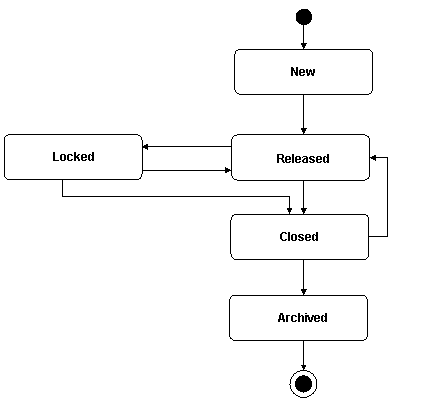
The figure below shows funds plan statuses and the possible transitions from one status to another:
Status |
Status Description |
|---|---|
New |
When you create a funds plan, the system automatically sets its status to New. Once you save the funds plan, you can create funds for the funds plan. However, budget consumption business transactions are not permitted on the funds. |
Released |
Once you release a funds plan, budget consumption business transactions are permitted on the funds that have the status Released. |
Locked |
You can lock a funds plan that has the status Released to prevent it temporarily from being processed. You may need to do this for auditing purposes. Once you lock a funds plan, the system automatically locks all funds that are assigned to it, without changing their status, and you cannot process them. |
Closed |
If all funds that are assigned to the funds plan have the status Closed or Canceled, you can close the funds plan. |
Archived |
If you have closed a funds plan and if all funds that are assigned to it have the status Closed or Canceled, the system archives the funds plan. For more information, see Archiving of Business Transactions. |
The system checks the status of the funds that are assigned to a funds plan to determine if a status change is possible. The following table shows the consistency checks that the system performs:
From Status |
To Status |
Check |
|---|---|---|
Released |
Closed |
All funds that are assigned to the funds plan must have the status Closed or Canceled. |
Locked |
Closed |
|
Closed |
Archived |