
 Optimization of Event Capturer in
J2EE
Optimization of Event Capturer in
J2EE

Use
This function enables you to optimize the event capturing in the SAP Web AS Java 6.40. You maintain a mapping file that consists of information as to what events need to be captured. This mapping file is uploaded to SAP Business Information Warehouse (SAP BW). If a Web application in SAP E-Commerce does not know what events need to be captured, it will capture all the events including the events for which no mapping is defined in BW. In some cases, this might lead to performance issues on both TeaLeaf and SAP BW.
To prevent this the Web application can be configured to retrieve the map file from BW via an RFC call. Function module implemented in BW return the configuration which can then be used by ISA during runtime.

An event is captured in the E-Commerce Web shop during runtime only when that event exists in the map file that is uploaded to BW.
Integration
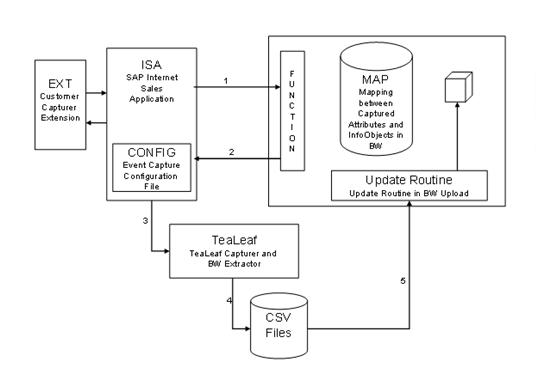
In the diagram above, the system makes an RFC call to BW to get the mapping file, that was uploaded into BW. Event information is captured only if it is in the configuration file downloaded from BW. If the BW connection is not successful for any reason, the SAP E-Commerce Web shop can be configured to:
· Capture all the information
· Use the last configuration downloaded from the BW
Features
· The information regarding what needs to be captured is maintained in the mapping file. The system synchronizes during bootstrap and captures only the content that is maintained in the mapping file.
· You do not need any code modifications to enable or disable capturing of information inside the event.
· This does not require application building and deployment.
In Extended Configuration Management (XCM), settings are to be made to facilitate the communication between BW and SAP E-Commerce during runtime. For more information, see XCM documentation.
Activities
You maintain the bwjcodata parameter in the XCM application configurations
For more information, see the application administration section under XCM documentation → <Application configuration>. For example, b2bcrmstandard → bwjcodata.
Example
If you are not interested in a business event delivered by SAP, for example, VIEW_CATALOG, then you can remove this event from the mapping file and upload the modified mapping file to the BW. If you have maintained the configuration as explained in the section above, the event VIEW_CATALOG will not be captured, thus reducing the volume of data captured. This improves the performance of data loading into BW.