 Invoice Claim
You can use this process to create an invoice claim. You can create an invoice claim when you receive an invoice document. The account sends an invoice to claim an amount that has been agreed on for a trade promotion.
Process
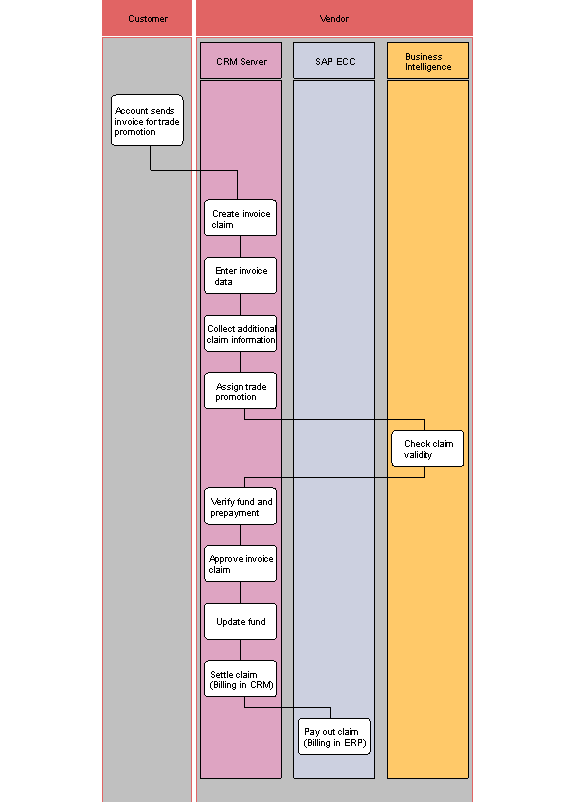
The following business process runs in SAP Customer Relationship Management.
Account sends invoice for trade promotion
The account sends an invoice to claim an amount that has been agreed on for a trade promotion.
Create invoice claim
You can create a new invoice claim in the CRM system.
Enter invoice data
You can enter the details of the invoice document.
Collect additional claim information
You can attach a document to the claim, for example a screenshot.
Assign trade promotion
You can associate the claim with a marketing project.
Check claim validity
You can determine the validity of the claim.
Verify fund and prepayment
You can verify the fund and prepayment details. You can also assign funds and prepayments.
Approve invoice claim
The claim must be approved as a precondition to settlement.
Update fund
The system automatically updates the fund.
Settle claim (Billing in CRM ®)
The claim is an item in the settlement due list. The system processes the settlement due list. The system then creates a credit memo for the claim account and posts accounting data.
Pay out claim (Billing in ERP ®)
Payout of the claim takes is handled in a back office application. Financial accruals are also consumed here.