 Trade Promotion Planning in CRM
This process shows you how to plan trade promotions. Based on the allocated funds, you create trade promotions either by copying and modifying existing trade promotions, or by using trade promotion templates. Once created, you can perform pre-analysis activities to assess planned spending. Trade promotions are then (mass) approved and released for execution.
Process
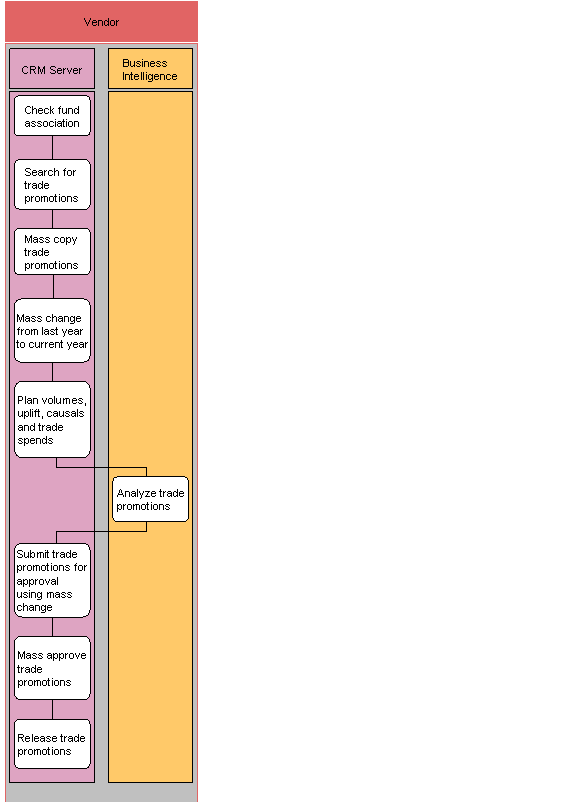
Check that funds have been allocated (SAP CRM)
Search for trade promotions (SAP CRM)
You search using the Marketing Calendar or an advanced search. If a working context is active, the search fields are pre-populated with selected default values.
Mass copy trade promotions (SAP CRM)
You select multiple trade promotions for copy using mass copy. This can be done either online or as a scheduled batch job.
Mass change date from last year to current year (SAP CRM)
You change dates either by entering a new absolute date, or by shifting the date by a certain amount of time.
Plan volumes, uplift, causals and spends (SAP CRM)
The system sends the volumes to APO for demand processing (optional).
Perform a pre-analysis (SAP NetWeaver BI)
Check remaining available funds (SAP CRM)
If there are sufficient funds remaining, you could create another trade promotion activity.
Create additional trade promotion using template (SAP CRM)
Use trade promotion templates to expedite the creation of individual trade promotions.
Submit trade promotions for approval via mass change (SAP CRM)
When changes are complete, you submit the trade promotions for mass approval. This triggers the following checks:
Promotion guideline check
Fund determination and availability check
Prepayment possibility
Overlap check
Mass approve trade promotions (SAP CRM)
Prior to approving the trade promotions, the manager can use the editable list view to check trade promotion details, such as key figures. You can also use this view to modify multiple trade promotions simultaneously.
After approving the trade promotions, you can schedule payments. The trade promotions are also subject to critical change checks and re-approval. Keep track of changes using the change history functionality and versions.
Release trade promotions (SAP CRM)
Relevant components of released trade promotions, such as condition records, are integrated with SAP ERP for execution. Released trade promotions also trigger accruals and fund usage.