 Warranty Analysis in CRM
You can use this business process to analyze warranties issued for products, objects, and components in your customers' installed bases. You can, for example, identify cases where warranties have expired in order to proactively offer further coverage, such as a warranty extension or a suitable service contract.
Process
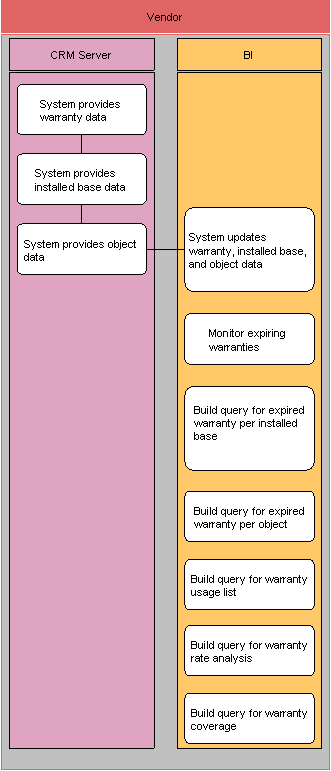
System provides warranty data (SAP CRM)
System provides installed base data (SAP CRM )
System provides object data (SAP CRM)
System updates warranty, installed base and object data (SAP NetWeaver BI)
During scheduled data extraction from SAP CRM to SAP NetWeaver BI, the system updates warranty information for installed base components and objects in SAP NetWeaver BI.
Monitor expiring warranties (SAP NetWeaver BI)
You can use the query Expiring Warranties (0CRM_ICWY_Q0101 and 0CRM_IOW1_Q0102) for this analysis.
Build query for expired warranty per installed base (SAP NetWeaver BI)
Build query for expired warranty per object (SAP NetWeaver BI)
Build query for warranty usage list (SAP NetWeaver BI)
You can use the query Warranty Usage List (0CRM_IOW1_Q0101) for this analysis.
Build query for warranty rate analysis (SAP NetWeaver BI)
You can use the query Warranty Rate (0CRM_PRI_Q0108) for this analysis.
Build query for warranty coverage (SAP NetWeaver BI)
For more information, see the application help for SAP Customer
Relationship Management in the SAP Library under  Analytics
 BI Content Service Analyses
Warranty Analysis
BI Content Service Analyses
Warranty Analysis  .
.