 Lead Analysis
You use lead analysis to analyze the success, efficiency, and processing over time of your lead management. For example, you can measure the success and efficiency of leads generated in a particular period of time, or for different products, or in different campaigns. You can also look at the transformation rates between open and won leads, and the success rates of different lead surveys. Furthermore, you can monitor the average duration until a lead is won or lost after the lead was initially given a qualification level.
Process
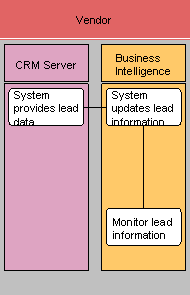
System provides lead data
Leads are captured and processed in SAP CRM. This information can be extracted to the SAP NetWeaver Business Intelligence component (SAP NetWeaver BI component) for analysis.
System updates lead information
By regularly extracting data from SAP CRM into SAP NetWeaver BI component, the system updates the lead data in SAP NetWeaver BI component.
Monitor lead information
After the lead data is updated, you can access the BI system, navigate to the reports, and monitor the following lead information:
Won/lost leads and the reasons why these leads were won or lost
For this analysis, you can use the query Lead Management: Won /Lost Leads - (0MKTG_C01_Q7001).
Summary of leads originating from different sources or channels
For this analysis, you can use the query Lead Management: Lead Origin - (0MKTG_C01_Q7002).
The success of lead surveys across different survey template versions
For this analysis, you can use the query Lead Management: Survey Analysis for Leads (Questionnaire) (0CRM_IS05_Q0001).
For more information about the delivered queries for lead analysis,
see the documentation in SAP Library for SAP NetWeaver BI component under  SAP Business Suite
  Customer Relationship
Management Analytics BI
Content
Customer Relationship
Management Analytics BI
Content  .
.