 Difference Calculation
You can use difference calculation to correct billing documents. Difference calculation can be triggered by the following:
An invoice correction item in a complaint with reference to a billing document
Prerequisites
You have made the recommended settings in Customizing for Customer Relationship Management:
You have defined item category DICR (Invoice Correction) by choosing
 Transactions
 Basic Settings Define Item Categories
 .
.You have assigned the business object type BUS2000168 (Debit Memo Correction Request Item) to the item category.
For the relevant business transaction category, you have assigned billing relevance Transaction-Related Billing According to Order Quantity to the item category.
You have set up item category determination for billing, for the item category DICR, by choosing
Billing Item Category Determination
Assign Item Categories .
For information on the settings required for complaints with reference to billing documents, see Customizing for Complaints with Reference to Billing Documents.
Features
During difference calculation, a correction subitem is created for the billing document item that is to be corrected.
During difference calculation, the system generates a new billing document with the following item pair:
A new, corrected billing item with the current data
A corrected billing item, which is a copy of the old billing item with the opposite plus/minus sign appearing for the quantity and amount
The sum of the quantities and amounts in this item pair is equal to the difference between the old and new data.
Example
The figure below shows two examples of difference calculation and is followed by an explanation:
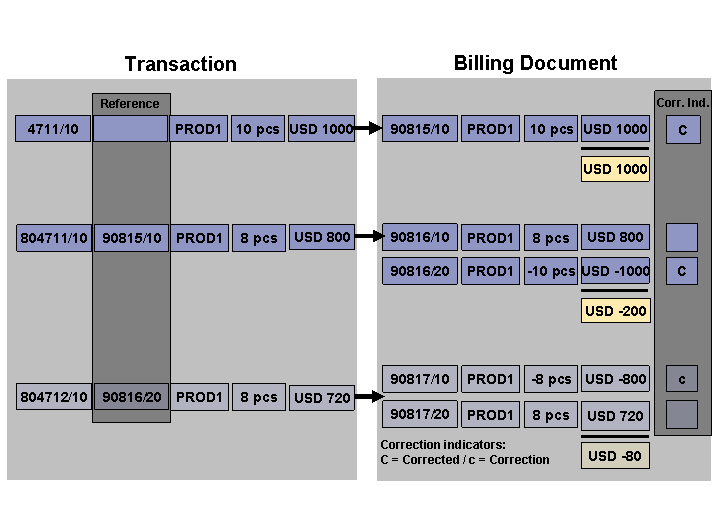
Difference Calculation for Complaints with Reference to Billing Documents
In item 10 of sales order 4711, a dealer orders 10 pieces of product PROD1 and receives billing document 90815.
The dealer reports that of the 10 pieces that were ordered, only 8 pieces arrived.
You create document 804711/10, a complaint with reference to a billing document. You reference billing item 90815/10, and enter the quantity that was actually delivered.
The system generates a new billing document (90816) with an item pair:
Item 10 as the billing item that includes the corrected data
Item 20 as the billing item with the original data and opposite signs for the quantity and amount
Because of the quantity change, the system calculates a difference of USD 200.
In a separate complaint, you also give the customer a price reduction. Because of the price change, the system automatically calculates a difference of USD 80.
Retroactive Billing
Product PROD1 is billed at a flat rate of USD 100 per piece (billing document 90815, item 10).
In a copying requirement, you have defined that this billing item is marked as relevant for retroactive billing.
A new price is maintained for product PROD1.
You start retroactive billing for billing document 90815, item 10.
When the new billing document (90816) is created, pricing is automatically run using the original price data. If the system finds a new price of USD 80 per piece, for example, the item pair of 10 and 20 shows a credit amount of USD 200.