 Additional Routing Rules
The Interaction Center (IC) WebClient agent inbox uses workflow to route incoming mails to agents. Additionally, certain business partner data can be used to further define which agents or groups of agents should process the mails. These routing rules can be assigned to object types such as users, positions, and organizational units.
 Example
This is an example of mail routing when two agent groups exist.
Mr. Smith sends an e-mail to service@company.com.
Julie and David (Agent Group 1) are assigned to process mails sent to this e-mail address.
The system identifies Mr. Smith's business partner (BP) data based upon his outgoing e-mail address.
The system determines that an additional rule can be used based upon Mr. Smith's country, US.
Michael and Julie (Agent Group 2) are assigned to an e-mail rule for US customers.
The system determines that only Julie should receive the incoming mail because she is the only agent in both of the agent groups.
If Julie was not in both of the groups, then all of the agents, David, Michael, and Julie, would receive the incoming mail.
Integration
These routing rules are used in addition to the standard SAP Workflow.
Prerequisites
You have maintained rules for e-mail on the SAP
Easy Access screen, by choosing  Interaction
Center
Interaction
Center  Interaction Center WebClient
Administration Agent Inbox
Maintain Rules for E-Mail
Interaction Center WebClient
Administration Agent Inbox
Maintain Rules for E-Mail  .
.
For more information, see Maintaining Rules for E-Mail
Features
Standard Mail Routing
In standard workflow, after a customer sends an incoming mail to the interaction center, the system retrieves the address the customer sent the mail to. It determines which agents are assigned for processing incoming mails for that address.
Mail Routing Using Additional Routing Rules
The following business partner data can be used to define how mails are routed:
Address
Country
Language
Name
Region
Postal code
To use other fields for defining additional routing, create a new
rule under ABAP-Workbench
Development Workflow
Definition Tools Rules for Agent
Assignment . The Responsibilities tab
allows the creation of rule definitions and assignments to agents.
Activities
The system determines which agents process incoming mails as follows:
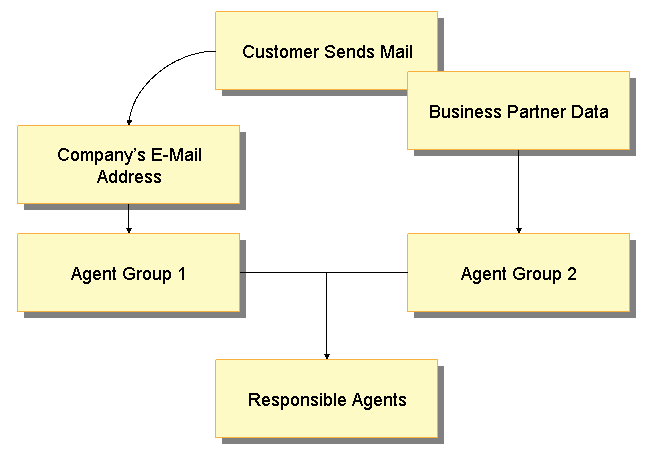
With additional routing rules, the system tries to determine the business partner by the customer's e-mail address. If the business partner is determined, attributes from the business partner master data can be used to further define which agents process the mail.
 Note
NoteIf the business partner cannot be determined, this additional routing is not enabled. Agents who are assigned to process mails for that incoming address receive the mail.
End of the note.The system checks which agents are assigned to the incoming mail address (Agent Group 1), as specified in the inbound distribution (recipient distribution).
The system checks which agents are assigned to process the specific business partner (BP) attributes (Agent Group 2) if the BP address or number is found. This depends upon the defined rules and which agents are assigned to them.
The routing depends upon how many agent groups exist.
Two agents groups
The mail is routed only to agents who are in both of the groups (Agent Group 1 and Agent Group 2). If no agents are found in both groups (agents in Group 1 and Group 2, but none belonging to both Group 1 and Group 2), the mail is routed to all agents in each group.
One agent group
If no agents are in Agent Group 1, the mails are routed to agents in Agent Group 2. Alternatively, if there are no agents in Agent Group 2, the mails are routed to agents in Agent Group 1.