
 Locking
Resources
Locking
Resources 
The repository framework implements locks to prevent the simultaneous update of resources.
The UML diagram shows the classes and interfaces that play a role in locking resources.
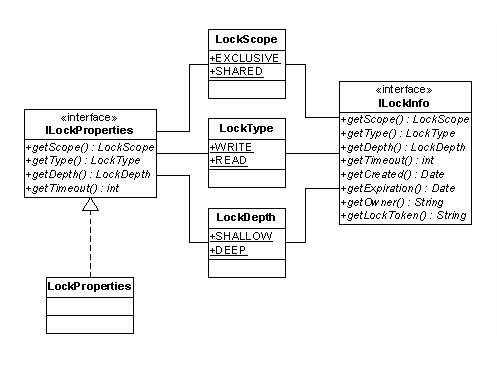
Classes and interfaces
Class or Interface |
Purpose |
ILockProperties |
A container for scope, type, depth and timeout of a lock. |
LockDepth |
Represents the
depth of the lock using the definitions of |
LockScope |
Represents the
scope of the lock using the definitions of |
LockType |
Represents the type
of lock using the definitions of |
ILockInfo |
A
container for all the information about a lock. It supplies a lock token which
is a |
Setting a Lock
You can lock a resource with the following methods of the IResource interface:
●
lock()
Locks the resource for the
user that is referenced in the resource context. The lock is an exclusive,
shallow write lock with an infinite timeout.
●
lock(ILockProperties
lockProperties)
Locks the resource with
the scope, type, depth and timeout specified in the ILockPropertiesobject.
The code extract shows how to set a shallow write lock with a timeout of one hour (60 minutes * 60 seconds * 1000 milliseconds).
ILockProperties lockProperties = new LockProperties(
LockScope.SHARED, // shared
LockType.WRITE, // write
LockType.SHALLOW, // shallow
(60 * 60 * 1000) //timeout 1h
);
Removing and Refreshing a Lock
To refresh or remove a lock, you use the methods refreshLock() und unlock(). Prerequisite for using the methods is the lock token which is provided by the ILockInfo object as shown in the code extract below.

It is the task of the client to persist the lock token so that it is available at the point in time when the lock needs to be removed or refreshed.
The code extract shows how to remove a lock.
ILockInfo lockInfo = resource.lock(lockProperties);
String lockToken = lockInfo.getLockToken();
…
ILockInfo restoredLockInfo = resource.getLockByToken(lockToken);
resource.unlock(restoredLockInfo);