
 Searching with Properties
The property search allows you to search for resources on the basis of their properties and property values. It enables you to construct a query that returns all resources that have properties and values that match the query. Using a property query, you can, for example, retrieve all resources that have been created in a certain timeframe.

The property search operates independently of the Search and Classification engine TREX. It is mainly intended for retrieving children within a collection. This means it is suited for a search through one level of a hierarchy, but usually not for a deep search through several levels. For deep searches it is advisable to use the KM index management service which is based on the functions provided by TREX.
In some cases, a deep search might be possible. The property search is closely related to the implementation of the repository manager. If the repository manager exposes search functionality of the backend system that supports the property search, then a deep search might perform well.
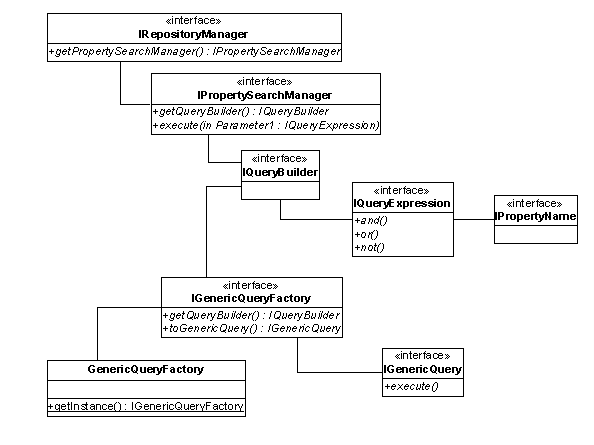
The UML diagram shows the classes and interfaces that play a role in the property search.
Constructing and Executing a Query
A number of steps are necessary to perform a property search. You proceed as follows:
...
1. Obtain an IQueryBuilder object to construct the query.
2. Construct the query using one or more IQueryExpressions.
3. Execute the query.

A deep query through several levels of a hierarchy or across several repositories is a very expensive operation.
Obtaining the IQueryBuilder
To construct a property query, you first need an IQueryBuilder object. There are two types:
● Generic
This
IQueryBuilder is suitable for all repositories and is not
specialized for a specific repository type. It is therefore useful for queries
that search across several repositories. You obtain it from the
IGenericQueryFactory.
● Specialized.
This
IQueryBuilder is optimized for a specific repository. You obtain
it from theIPropertySearchManagerwhich is accessible via the IRepositoryManager
of the repository
involved. The query that you construct can only be executed in the repository
where you obtain the IQueryBuilder.
Constructing the Query
Once you have an IQueryBuilderobject, you can construct an IQueryExpression with the available methods. An expression is a WHERE clause that defines the required values for a specific property (IPropertyName). You can combine several expressions with the boolean operators and(), or() and not().
Executing the Query
When you have constructed the query, you execute it to retrieve the resources that match the query. The call for the execution differs, depending on the type of IQueryBuilder that was originally used:
● If a generic QueryBuilder was used, you convert it into an IGenericQuery before executing the query with the execute() method.
● If a specialized QueryBuilder was used, you call the search() method offered by IResource as shown in the code extract .
Examples
The following
examples show how to retrieve the resources that match the following WHERE
clause:
( ‘{http://sapportals.com/xmlns/cm}contenttype’ like ‘%.jpg’
or ‘{http://sapportals.com/xmlns/cm}contenttype’ like ‘%.gif’
) and
‘{http://sapportals.com/xmlns/cm}createdby’ = ‘admin’
Example for a Generic QueryBuilder
ICollection start = (ICollection)factory.getResource(″/documents″, context);
IGenericQueryFactory queryFactory = GenericQueryFactory.getInstance();
IQueryBuilder queryBldr = queryFactory.getQueryBuilder();
IQueryExpression queryExpr =
queryBldr.like(PropertyName.createContentType(), ″%.jpg″).or(
queryBldr.like(PropertyName.createContentType(), ″%.gif″).and(
queryBld.eq(PropertyName.createCreatedBy(), ″admin″)
)
);
IGenericQuery query = queryFactory.toGenericQuery(queryExpr);
IResourceList result = query.execute(
start, // the collection to start at
1, // just the children of this collection
Integer.MAX_VALUE, // maximum result size
false // don’t include versions
);
Example for a Specialized QueryBuilder
ICollection start = (ICollection)factory.getResource(″/documents″, context);
IRepositoryManager repositoryMgr = start.getRepositoryManager();
IPropertySearchManager searchMgr = repositoryMgr.getPropertySearchManager(start);
IQueryBuilder queryBldr = searchMgr.getQueryBuilder();
IQueryExpression queryExpr =
queryBldr.like(PropertyName.createContentType(), ″%.jpg″).or(
queryBldr.like(PropertyName.createContentType(), ″%.gif″).and(
queryBld.eq(PropertyName.createCreatedBy(), ″admin″)
)
);
IResourceList result = start.search(
queryExpr, // the WHERE clause
1, // just the children of the start collection
Integer.MAX_VALUE, // maximum result size
false // don’t include versions
);