
 Creating, Retrieving and Updating
Properties
Creating, Retrieving and Updating
Properties 
The diagram shows the interfaces and classes that play a role when you work with properties. Properties have a name (IPropertyName), type (PropertyType), some attributes, a description and a value.
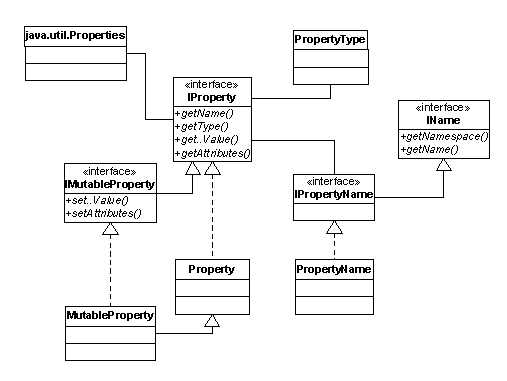
Interfaces and Classes
Interface or Class |
Description |
IProperty |
Offers read-only operations for properties. |
IMutableProperty |
Provides write operations for properties. |
IPropertyName |
Represents the name of the property. It stores the namespace and name and is derived from com.sapportals.wcm.repository.util.IName |
PropertyType |
Each property has a type that you access with PropertyType. |

The name of a property defines its identity. It is comprised of an optional XML namespace and a local name: {namespace}local name. For example,
{http://sapportals.com/xmlns/cm}displayname
Creating a Property
The code extract shows how to set a new property. A property always needs a value, otherwise it does not exist. You therefore cannot assign null as the value of a property.
boolean value = true;
IProperty property = new Property(propertyName, value);
resource.setProperty(property);
Retrieving a Property
The code sample shows how to retrieve an existing property:
String namespace = “http://sample.com/xmlns/sample”;
String name = “property”;
IPropertyName propertyName = new PropertyName(namespace, name);
IProperty property = resource.getProperty(propertyName);
if(property != null) {
// property exists
String value = property.getValueAsString();
} else {
// property is not set for this resource
}
Updating a Property
To update a
property you have retrieved, you use IMutableProperty. The code sample changes the value of the
boolean property to true. If there is a type mismatch, for example, when a
string value is assigned to an integer property, a ResourceException is
thrown.

If live properties are involved, an update might cause side effects or throw exceptions.
IMutableProperty mutableProperty = property.getMutable();
mutableProperty.setBooleanValue(true);
resource.setProperty(property);
Determining the Property Types
It is sometimes useful to know the property type, for example, before executing sort operations or manipulating property values. The code extract shows how to determine the property type.
if( PropertyType.BOOLEAN.equals(property.getType()) ) {
boolean value = property.getBooleanValue();
} else if { PropertyType.DATE.equals(property.getType()) ) {
Date value = property.getDateValue();
} else if { PropertyType.INT.equals(property.getType()) ) {
int value = property.getIntValue();
} else if { PropertyType.LONG.equals(property.getType()) ) {
long value = property.getLongIntValue();
} else { // PropertyType.STRING and PropertyType.XML are mapped to String
String value = property.getValueAsString();
}