
 Creating, Retrieving and Updating
Content
Creating, Retrieving and Updating
Content 
The interface
IContent represents content in the repository framework. It
is implemented by the Content class as shown in the class diagram:
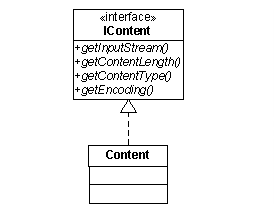
When you initially
create a resource with the create() method, you can also specify its content. If the
resource already exists and has content, you can retrieve the content with the
getContent() method:
IContent oldContent = resource.getContent();
If the resource
exists, but has no content, or you want to change the existing content, you
can use the updateContent()method. The code extract shows how to set the plain
text “content” as the content of the resource.
String dataString = new String(″content″);
ByteArrayInputStream dataStream = new ByteArrayInputStream(
dataString.getBytes()
);
IContent newContent = new Content(
dataStream,
″text/plain″,
dataStream.available()
);
resource.updateContent(newContent);

Changing the
content of a resource also updates the values of the live properties for
content length, content type, and encoding. The properties are contained in
the IContent object and returned by the IContent.get()
methods.
The values of the other content-related live properties like entity tag and last modified are also updated. These can be accessed with the IResource.getProperties()methods.