
 ERP E-Commerce SU01 Logon via UME

Use
The User Management Engine (UME) provides centralized user management for your Web-based applications, and you can configure it to work with user management data from several sources. In ERP E-Commerce you can use the UME logon application with the ERP E-Commerce SU01 logon to enhance your Web-based application logon functionality. A typical reason for combining User Management in ERP E-Commerce with UME is when you are running ERP E-Commerce in the SAP NetWeaver Portal.
Integrating UME with your E-Commerce logon procedure ensures that the system carries out the following checks when a user tries to logon to an application:
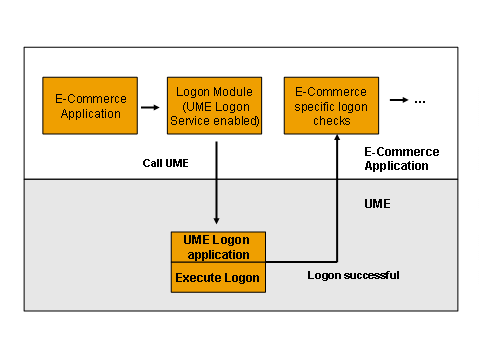
· The system carries out the first check when the user logs on using the user ID and password. The system calls the UME logon application, which checks the user data and creates a single sign-on (SSO) ticket if the check is successful.
· The system uses this SSO ticket to perform the second security check, this time within the SAP E-Commerce application the user is trying to access.
Once logged on with the UME logon application, the user can access all SSO-enabled applications using the SSO ticket. To provide SSO functionality you must ensure that the UME and ERP E-Commerce users have the same user IDs.
The E-Commerce logon procedure with UMEruns as in the diagram below:
To combine User Management for ERP E-Commerce with the UME user base you have to maintain the ERP E-Commerce users and the UME users simultaneously. You can do this in one of the two following ways:
· UMEuses the SAP E-Commerce user base in the backend system as its own user base.
This scenario is relatively easy to configure, however in the portal environment it has the consequence that all portal user, not only the ERP E-Commerce users, have to be created and maintained in the backend system. You configure UME to use the ERP E-Commerce user base.
· UMEuser base and SAP E-Commerce user base are separate.
This means that you have to synchronize the two user bases. You have to configure the ERP E-Commerce Web-based User Management application by choosing a specific base configuration (b2bWithUME) in the Extended Configuration Management (XCM)application for the User Management tool. In addition, you have to define mappings between the roles for Web shop users and the UME roles.

For detailed installation and configuration of this scenario, see SAP Note 713472.
Procedure
To enable the ERP E-Commerce SU01 logon via UME with UME you need to carry out the following configuration activities:
...
1. Configure the UME logon application.
For more information on configuring the UME logon module, see the UME Configuration documentation in SAP Solution Manager.
2. To enable UMEset the usertype parameter in Extended Configuration Management (XCM) for Web-based User Management:
a. Log on to XCM at: http://<server:port>/<appname>/xcm/init.do
b. Select Start ® Application Configurations ® Customer and select the application configuration.
c. Set the value for the usertype parameter
3. Enable SSL Extended Configuration Management (XCM) for Web-based User Management (optional):
a. Log on to XCM at: http://<server:port>/<appname>/xcm/init.do
b. Select Start ® General Settings ® Customer and select the application configuration.
c. Select the SSLEnabled parameter and set the value to true
See Also:
For more information on UME, see the User Management Engine (UME) documentation and SAP Note 805713.