
 Cancellation

Use
You can use a cancellation to reverse both new leasing documents (quotations and contracts, for example NEWL) and leasing documents that were created as a result of change processes (BLEX, RNEW). In this case, the change processes are also reversed.
Prerequisites
In Customizing for the actions, you must define the cancellation as an action so that this option is displayed and can be executed in the leasing document.
You do this in Customizing for Customer Relationship Management, by choosing Basic Functions → Actions → Actions in Transaction:
1. Create Actions with Wizard
2. Change Actions and Conditions → Define Action Profiles and Actions
Features
If you call the cancellation from the document header, all items of the document are included. If you call the cancellation at item level, in the first processing step the system selects only this item for cancellation.
In the second processing step, the system uses the header and item business categories to check which items and dependent objects, such as invoices and purchase orders, need to be processed for cancellation.
In the third processing step, the system selects all further items and documents linked via the invoices for cancellation.
Invoices and purchase orders do not exist as independent documents in the CRM system; they are located in the connected purchasing system (SAP SRM). Therefore, invoices and documents are not cancelled directly. Instead, a cancellation request is sent to the connected purchasing system via an XI interface.
The status of the leasing document determines whether an associated invoice or purchase order is also processed.
If an invoice is also cancelled, for example, the system checks whether there are other leasing items for this invoice. If there are, these leasing items are also cancelled.
The following transaction types are available for canceling leasing documents:
●
Cancellation of
a quotation:
Both invoices and purchase orders are cancelled.
●
Cancellation of
a certificate of acceptance:
The invoices for the items to be cancelled are displayed on the screen. You
can set indicators to determine whether the invoices are to be cancelled.
Purchase orders are not cancelled.
●
Cancellation of
a contract:
If a contract item is cancelled,
the associated invoices are also cancelled.
Purchase orders are not cancelled.
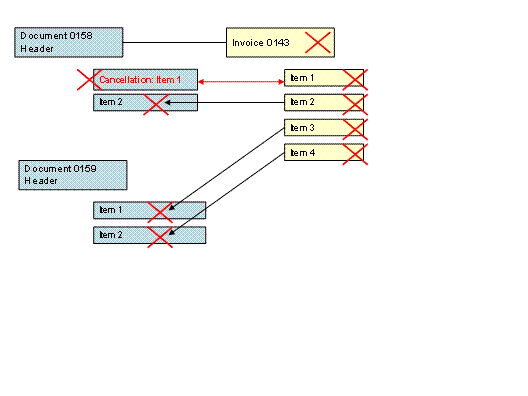
An invoice is connected to the leasing document header and consists of invoice items. The invoice items are assigned to the leasing document items. If an invoice is cancelled, the complete invoice and all its items are cancelled. Since the invoice items can point to different document items of different documents, these items or documents must also be cancelled.

You have selected an item for cancellation. The system selects and displays other documents and items for cancellation on the basis of the associated invoice items.
Cancellation of a change process
If a change process is cancelled, the system checks which predecessor documents need to be resurrected.
Activities
At document header or document item level in the leasing document, you can choose Actions to schedule and execute cancellation.
The following is displayed on the screen:
● Items for cancellation
● Invoices (SRM documents) for cancellation
● Items to be activated (documents to be resurrected)
If the cancellation relates to a certificate of acceptance with invoice, you can manually flag the associated invoice for cancellation.
You execute the cancellation by choosing the action Cancel Complete Document (header level) or Cancel Contract Item (item level).
The system displays the status of the cancelled item as Completed in the Display Status assignment block.
To complete the cancellation, choose Save.