
 Case Management in Account
Origination
Case Management in Account
Origination

Use
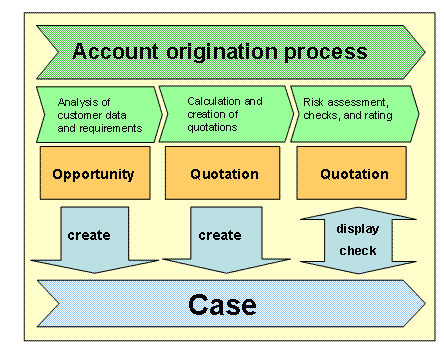
Case Management enables you to manage and process all information that arises during the account origination process in a central object: the case. You can group different information in a case, such as business partners and documents.
You can use Case Management to process complex situations that involve multiple processing steps or multiple processors. Case Management therefore supports the processing and communication flow between organizational units and ensures an efficient workflow.
Prerequisites
● In Customizing, you have made the basic settings for Case Management. For more information, see Customizing for Financial Services → Account Origination à Case Management for Financial Services à Case Management: Standard Settings and Document Management.
● You have defined the required product hierarchies as product hierarchies for the account origination process.
For more information, see Customizing for Financial Services → Account Origination → Case Management for Financial Services → Process Control → Define Hierarchies for Acquisition Processes.
● To generate a case from an opportunity or a quotation from a case, you have assigned the process categories to the relevant case types and transaction types.
For more information, see Customizing for Financial Services → Account Origination → Case Management for Financial Services → Process Control → Assign Process Category to Case Type and Transaction Type.
● If you want to generate a case from an opportunity, you have defined the settings for mapping partner functions. You can also use mapping to generate a quotation from a case.
For more information, see Customizing for Financial Services → Account Origination → Case Management for Financial Services → Process Control → Assign Partner Function: Case – FS Quotation and Partner Function Assignment: Opportunity – Case.
● If you want to create customer-specific attribute enhancements for documents that you add to a case, you have defined these enhancements in Customizing either for all documents or for a document type.
For more information, see Customizing for Financial Services → Account Origination → Case Management for Financial Services → Document Management → Attribute Enhancement.
● To be able to check the existence of documents in Case Management in business transactions, you have grouped these documents in actions.
For more information, see Customizing for Customer Relationship Management → Basic Functions → Actions.
Features
In account
origination, you use generic functions of CRM Case Management. For more
information, see
 Case
Management.
Case
Management.
SAP delivers case types for account origination, including the following:
● Case type FSO1: Mapping of mortgage loans
● Case type FSO2: Mapping of consumer loans
Record models are also available for the case types delivered (SCASE). You assign to the record models the elements needed to handle account origination. These elements can include the business partner, quotation, or checklists for documents.

By assigning elements to the checklist of a record model, you can use rules from the Business Rule Framework (BRF) in the origination process to check whether the customer has provided the documents needed for processing.
With the integration of the BRF in Case Management, you can define rules that help you to:
● Check that all documents for a case are complete (using checklists)
● Check the attributes that you created using attribute enhancements
● Restrict the node for required documents, depending on the process category
In the financial service quotation (FS quotation), you start the checks with the BRF available in the standard system.
For more information, see Business Rule Framework in Account Origination.
During account origination, you can generate documents on the basis of Case Management. It makes sense to do this because the system transfers the relevant data from the preceding document, so you do not have to enter the data twice.
● Creating a case from an opportunity
The system creates the case that matches the opportunity settings.
If you generate a case from an opportunity, you can use a Business Add-In (BAdI) to change the standard assignment of case type to product category and the transfer of the responsible employee to the case.
For more information, see Customizing for Financial Services → Account Origination → Case Management for Financial Services → Process Control → BAdI: Determination of Case Type and Responsible Employee.
● Creating a quotation from a case
The system creates the quotation that matches the case settings.
These functions are defined as actions and integrated in Case Management.
Activities
● If you want to create a record model or edit the existing record models, choose Customizing for SAP Web Application Server → Application Server → Basis Services → Records Management → Customizing for Record Models, Records, and Documents.
● To edit cases, choose the application Cases in the assignment block Acquisition and Sales.