Filters
Use
Before a resource is read or saved it can be processed in various ways by a filter. Different types of filters serve different purposes:
· Content filter process the content of resources
· Property filter modify and control the visibility of resource properties
· Namespace filter control the visibility of resources.
In addition to these filter types, there is a difference between read and write filter. If a filter is applied before a resource is displayed, then it is a read filter. If the filter is applied before the resource is saved, then it is a write filter.
Features
Property Filters
Property filters manipulate resource properties and their visibility. They can modify, delete or add properties to a resource. For example, with the help of a filter it is possible to change the property that specifies the author of resource. The personal name of the author can be changed to the company name.
Namespace Filters
Namespace operations like displaying the children of a collection or fetching a resource involve mapping a RID to a resource. When such operations are performed, a filter can be used to manipulate the mapping of the RID to the resource. For example, in an authoring environment, a filter can map different resources to a RID, depending on the user involved. When the author wants to view the document, the current raw version of the resource is mapped to the RID. When others want to see the document, the last published version is mapped to the RID.
In the KM environment namespace filters are implemented for certain applications, for example, for time-dependent publishing and collaboration services like personal notes, feedback and comments. In these applications, the namespace filters are used to control the visibility of resources. For example, when time-dependent publishing is active and the methods getChildren(), getResource() or Search()are executed, a namespace filter is applied to ensure that only resources that may be viewed and published are returned.
Content Filters
Content filters can be applied to resources before they are viewed or saved. Their main purpose is to change the format and layout of a file before presenting it to a client. They merge the content of a file with metadata and in this way are able to represent the same data in different formats that can be viewed on different devices. For example, with the help of filters, an XML file that contains a particular content can be transformed into an HTML file for display in a browser or into a WML file for display on a handheld device. Similarly, the content of a file can be presented in different formats to serve different audiences. The same information can be distributed as a news column, a business report or a text file. The advantage of this filter type is that it makes it easy to reuse content in different environments.
The Knowledge Management platform includes standard implementations of content filter. An application that wants to use the filter for its own purposes must provide an XSL or HTML style sheet that meets its layout requirements and configure the filters so that the stylesheets are applied to the required resources.
Activites
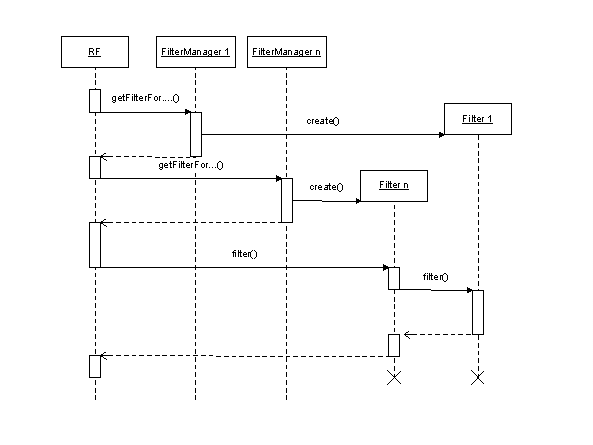
When filters are active, the repository framework, filter managers and filters are involved in the filtering process. The diagram below shows these objects and the sequence of calls that takes place when a client requests to read a resource.
First the repository framework retrieves the data of the resource from the repository manager. Then it obtains instances of the filters that have to be applied to the resource from the filter managers. If several filters have to be applied, they have priorities. In this case, the repository framework calls the filter method of the filter with the lowest priority (the last filter). This filter then calls the filter method of its predecessor to receive the filtered result of the predecessor and so on. In this way a chain of filters is called and applied as shown in the following code fragment for a namespace filter:
public class NamespaceFilter implements INamespaceFilter {
protected INamespaceFilter predecessor;
public NamespaceFilter(INamespaceFilter predecessor)
throws WcmException {
this.predecessor =
predecessor; // The filter gets a reference to its
predecessor.
}
public IResourceList filter()
throws WcmException {
IResourceList resultList = this.predecessor.filter();
//Here the already filtered result of the predecessor is processed by the
current filter.
}
Sequence Diagram for a Filter