Providing Business Configuration
Purpose
The configuration framework for Knowledge Management stores and manages configuration parameters. If you develop a new component that requires configuration parameters, you need to define and deploy them correctly so that they can be recognized and managed by the configuration framework. Once parameters are recognized by the configuration framework, they can be displayed and modified in the Knowledge Management iView for configuration.
Process Flow
To define parameters for a new component, you create a:
· Directory structure
· configArchive.properties file
· Config class
· Configurable
· Bundle file

If you use a KM wizard in the SAP NetWeaver Developer Studio, everything except the bundle file directories and the bundle file are created automatically. However, you must adapt the contents of the files, using the information in the following sections.
Parameter Definition
...
1.
In your development
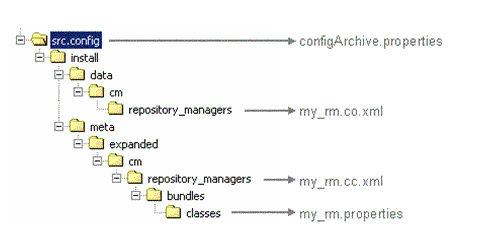
project, create the directories as shown in the example for repository
managers below.
If you use a KM wizard, the directories are created automatically.
2.
Create a configArchive.properties
file.
If you use a KM wizard, the file
is created automatically, but you need to modify it.
3. Create a config class to define the configuration parameters and their metadata.
A config class is an XML file that specifies the parameters for a component and their associated metadata. The metadata defines details like the valid values for parameters, how they are displayed and whether or not they are mandatory. Like Java classes, config classes can be derived from other classes and are part of a class hierarchy.
4. Define a configurable to assign initial values to the parameters.
Configurables are instances of config classes. They are XML files that assign values to the parameters defined in the config class. When they are deployed together with a component, they control the initial configuration of the component.
5. Provide a bundle file that defines how parameters are displayed on the user interface.
Bundles are files that define details like user-friendly versions of technical names, tool tips, abbreviations and descriptions.
Location of Configuration files
When you create a config class, configurable or bundle file, it is essential to comply with naming conventions and to include files at the correct location in a development project. This ensures that the configuration information is deployed to the appropriate directories, is registered by the component runtime, and is integrated in the configuration framework.

The figure shows where configuration files for a repository manager
(my_rm) are stored in the directories of a project of the
SAP NetWeaver Developer Studio.
The configurable is stored in my_rm.co.xml
The config class is stored in my_rm.cc.xml
The bundle file is stored in my_rm.properties