
 Complaints and Returns Analysis in
CRM
Complaints and Returns Analysis in
CRM

Purpose
You can use this
business process to analyze key figures that provide information about the
quality of your services and enable you to draw conclusions about the level of
customer satisfaction. While you can use the process
 Customer Satisfaction
and Loyalty Analysis to measure customer satisfaction on an abstract
level, Service Quality Analysis enables you to identify the possible
causes of dissatisfaction with the quality of individual service products,
whether this be problems related to your internal processes, such as long
processing times, or the quality of the service performed by the service
representative.
Customer Satisfaction
and Loyalty Analysis to measure customer satisfaction on an abstract
level, Service Quality Analysis enables you to identify the possible
causes of dissatisfaction with the quality of individual service products,
whether this be problems related to your internal processes, such as long
processing times, or the quality of the service performed by the service
representative.
Process Flow
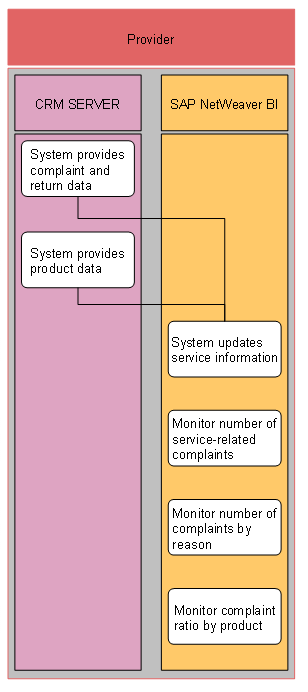
...
1. System provides complaint and return data (SAP CRM)
2. System provides product data (SAP CRM)
3. System updates service information (SAP NetWeaver Business Intelligence (SAP NetWeaver BI))
During scheduled data extraction from SAP CRM to SAP NetWeaver BI, the system updates the above data in SAP NetWeaver BI.
4. Monitor number of service-related complaints (SAP NetWeaver BI)
You monitor the number of complaints relating to the services that you provide. You can use the query Number of Service Complaints (0CSAL_C09_Q0101) for this analysis.
5. Monitor number of complaints by reason (SAP NetWeaver BI)
You compare the number of service orders with the trend in the number of complaints to determine whether order numbers are falling due to customer dissatisfaction.
You can use the query Changes in Processing Volumes (0CSRVMC03_Q0101) for this analysis.
6. Monitor complaint ratio by product (SAP NetWeaver BI)
You identify possible quality problems with individual products. You can use the query Complaint Ratio by Product (CSRVMC04_Q0101) for this analysis.
For more information about the predefined queries provided by SAP, see the SAP Library documentation for SAP NetWeaver BI, under BI Content ® Customer Relationship Management ® Service ® Queries.
For more information about the Business Explorer analytics tool in SAP NetWeaver BI, see the SAP Library documentation for SAP NetWeaver BI, under Business Explorer.