
 Commission Simulation
Purpose
You use this business process in order to view the possible value of a commissionable sales opportunity using the Commission Simulation iView accessed through the Sales Manager or Sales Representative Portal. Commission simulation processing uses actual incentive plan contract data from ICM. By adjusting the sales parameters, you can view multiple “what-if” commission scenarios for the same sales opportunity.
Process Flow
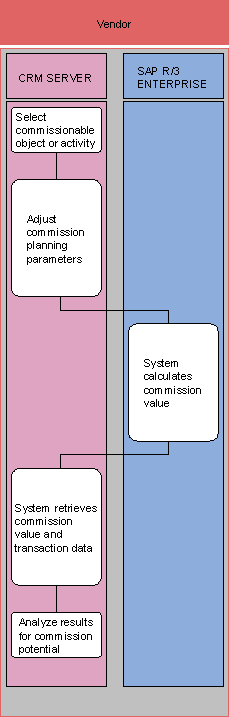
1. Select commissionable object or activity (SAP CRM)
You access the Commission Simulation iView through the Sales Manager or Sales Representative Portal and select a commissionable object or activity (such as a Sales Order, Sales Contract, Opportunity or Product).
2. Adjust commission planning parameters (SAP CRM)
At the Commission Simulation iView, you enter the sales parameters that define a “what if” sales scenario. Once complete, you launch the calculation.
3. System calculates commission value (SAP R/3)
The system calculates the commission value based on the incentive plan contracts created and maintained within ICM.
4. System retrieves commission value and transaction data (SAP CRM)
The system returns the potential commission value.
5. Analzse results to commission potential (SAP CRM)
You analyze the information returned to the Commission Simulation iView within the Sales Manager or Sales Representative Portal.

You can change the parameters and launch the calculation cycle multiple times to view how changes to the sales scenario would affect commissions on the possible sale.