
 Including the UME
Libraries and Web Service References
Including the UME
Libraries and Web Service References 
Use
The UME permission methods are included in the com.sap.security.api.sda library.
Add these libraries to both the EJB and EAR projects.
In addition, you have to add the reference to the WS Security service tc/sec/wssec/serviceto the Web Dynpro project.
Prerequisites
|
|
The J2EE perspective is displayed in the SAP NetWeaver Developer Studio. |
|
|
The quick car rental application’s projects are displayed in the J2EE Explorer. |


Procedure
Adding the libraries to the EJB project
...
1. Select the J2EE_QuickCarRentalEjb project, open the context menu with the right mouse button and choose Add/Remove Additional Libraries.
The J2EE libraries/interfaces/service dialog appears.
2. Select com.sap.security.api.sda and choose OK.
3. Confirm the message that you also have to add the libraries to the EAR project with OK.
Adding the libraries to the EAR project
...
1. Expand the J2EE_QuickCarRentalEAR project.
2. Open the application-j2ee-engine.xml file by selecting it with a double-click.
The properties for the file appear in the multi-page editor.
3. To add the library references, in the General tab page, select the References element and choose Add.
4. Choose Select library/interface/service from the dialog that appears.
5. Select com.sap.security.api.sda from the J2EE libraries/interfaces/service dialog and choose OK.
The libraries are added as references to the EAR project as shown below.

6. Save the data.
Adding the libraries to the Web Dynpro project
...
1. Switch to the Web Dynpro perspective and the Web Dynpro Explorer.
2. Select the TutWD_CarRental project, open the context menu and choose Properties.
The Properties for TutWD_CarRental dialog appears.
3. In the left pane, select Web Dynpro References; in the right pane, choose the Service References tab page.
4. If the tc/sec/wssec/service is not included in the list of service references, insert it as follows:
a. Choose Add.
The Create new reference dialog appears.
b. Enter tc/sec/wssec/service as the service name for the WS Security service and choose OK.
The reference is added to the list of service references. See the figure below.
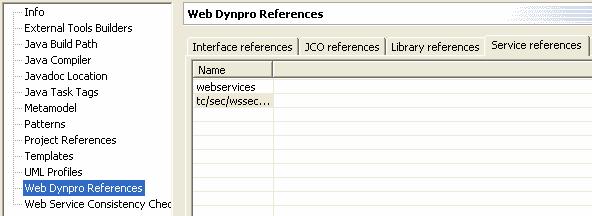
5. Choose OKto continue.
6. Save the metadata.
Result
The security libraries that contain the UME permission methods are added to the EJB and EAR projects. A reference to the WS Security service is added to the Web Dynpro project.
Next Step:
Specifying Authentication for the Application