
 Defining Messages
The Web Dynpro tools provide a special Message Editor for defining messages of different types.

A message is defined by a specified key, message type, and message text. The three message types error, warning, and standard are predefined. At runtime, messages of different types are displayed in the Web browser using an appropriate layout – for example, specific icons for error, warning, or standard.
The message texts can contain arguments. The format of these arguments is defined by the specifications of the java.text.MessageFormat class.

When defining Web Dynpro message texts with placeholders, the following restriction applies: You cannot use element formats in placeholders, but only integer arguments. A message text such as "On {0,date} at {0,time} the number {1} is again {2,number,integer}" is therefore not permitted and must be replaced with "On {0} at {1} the number {2} is again {3}".
In Web Dynpro message texts, all parameters are treated as strings. You convert parameters of the type Data and Time into a String value according to the format method of the relevant Java Dictionary type.
Therefore, all context attribute values to be displayed in placeholders of message texts must be converted to strings by calling the method IWDNodeElement.getAttributeAsText("<Attribute Name>").
A Java class IMessage<ComponentName> is generated using the messages defined in the Message Editor. This class contains each message as a constant. Message texts can be output at runtime according to the defined settings using the IWDMessageManager interface. The corresponding parameters must be passed for each defined message. The access to the message texts is key-based, the message texts themselves are stored in separate files after the translation process for different languages.

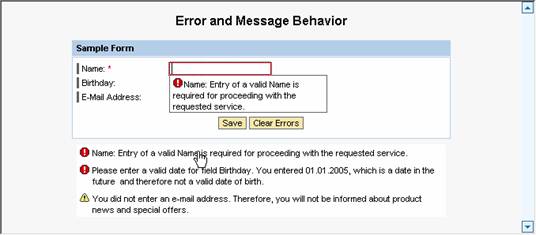
An example: In the Message Editor, you define a message of the type error using the MissingInput key. The message text contains the label text for the entry field as a placeholder. This placeholder is indicated by {0}.
Messages Defined in the Message Editor |
||
Message Key |
Message Type |
Message Text |
MissingInput |
error |
{0}: Entry of a valid {0} is required for proceeding with the requested service. |
You can display the defined message in the implementation of the view controller using the method reportContextAttributeMessage()of the IWDMessageManager interface. The message is contained in the generated IMessageSimpleErrors interface as a constant called MISSING_INPUT. The value of the placeholder {0} is passed in the array {"Name"}.
Implementation of the View Controller |
... IWDMessageManager msgMgr = wdComponentAPI.getMessageManager(); msgMgr.reportContextAttributeMessage( wdContext.currentContextElement(), attributeInfo, IMessageSimpleErrors.MISSING_INPUT, new Object[] {"Name"}, true); ...
|
After executing this source code, the error message is displayed on the user interface in the Web browser, as follows:
Procedure
...
1.
Select the
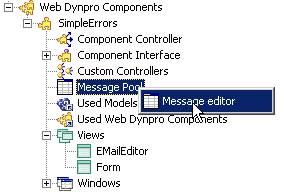
Message Editor of the Web Dynpro component SimpleErrors by
choosing the node  Message
Pool in the Web Dynpro Explorer:
Message
Pool in the Web Dynpro Explorer:
2.
Add the following
three messages using the  button in the Message Editor:
Messages Defined in the Message Editor |
||
Message Key |
Message Type |
Message Text |
DateIsInFuture |
error |
Please enter a valid date for field {0}. You entered {1}, which is a date in the future and therefore not a valid date of birth. |
DesiredEMail |
warning |
You did not enter an e-mail address. Therefore, you will not be informed about product news and special offers. |
MissingInput |
error |
{0}: Entry of a valid {0} is required for proceeding with the requested service. |
 The next step is to implement methods for
error handling and the action event handlers in the controller of the view
form.
The next step is to implement methods for
error handling and the action event handlers in the controller of the view
form.