
 Specifying the Policy Domain to Use for
Authentication
Specifying the Policy Domain to Use for
Authentication 
Use
To apply the authentication mechanism to your application, you must also specify which policy domains on the AS Java use this authentication, for example, either the root domain for the application or a set of sub-domains. For more information about policy domains, see Configuring Authentication.
For this tutorial, you will specify that the authentication applies to the application’s domain, which is /QuickCarRental. Other applications running on the AS Java will not have access to the user’s authentication information.

If all applications running on the AS Java are to use the authentication, then specify the wildcard entry /*.
Prerequisites
|
|
The quick car rental application’s Web client project, J2EE_QuickCarRentalWeb, is displayed in the J2EE Explorer. |


Procedure
...
1. Open the web-j2ee-engine.xml file by selecting it with a double-click.
2. Select the Security tab page.
3. Select the login configuration element.
4. In the login configuration section, enter/QuickCarRental in the Security policy domain field.
See the figure below:
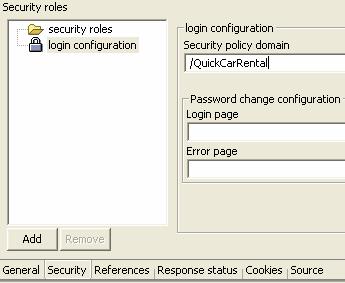
Do not enter anything in the Password change configuration section.
5. Save the data.
Result
The authentication specified applies to the /QuickCarRental domain for the application.
The<security-policy-domain> element is added to the deployment descriptors for the Web application in the web-j2ee-engine.xmlfile as shown below:
<web-j2ee-engine> |
Next Step:
Creating a J2EE Security Role for Accessing the Application