
 Tutorial: Developing with
Tables in Web Dynpro
Tutorial: Developing with
Tables in Web Dynpro 
The display of data records in tables and forms and the editing of these – for example, selecting, deleting, or sorting – are central functions in Web applications.
The data structure that is the basis for this determines the layout of the table or a form. Therefore, you will first create the context in this tutorial and bind the data to this context. Based on the data structure that this available, you can bind the table and the form to the context during creation. The generation of columns and input fields as well as the assignment of fields to the attributes of the context then takes place automatically.
In this tutorial, you will learn how to:
· Create and map the context of the component controller and the views
· Create a table and map it onto the view context
· Create a detailed form and map it onto the view context
· Implement a function for sorting table rows
· Implement a function to delete single or several rows
· Implement a function for calculating totals for individual articles and implementing a total sum
· Format according to different currencies
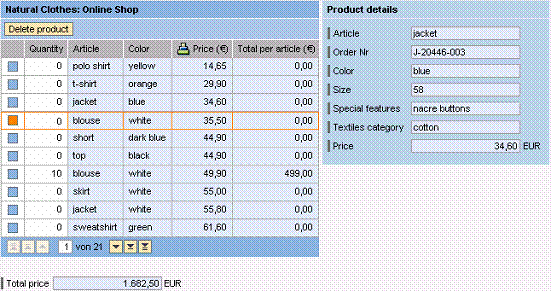
The project template TutWD_Table_Init forms the basic structure of the application.
This includes:
· A structure in the Local Dictionary that defines the fields of a product data record and thus the columns of the table to be created
· A second structure for price calculation and currency formatting
· A window in which two views are grouped for displaying the table and the detailed form
· Sample data for the shopping basket is stored in order to make creation of a data model unnecessary.
· A Java class TableSorter that provides the sort function
Prerequisites
Systems, Installations, and Authorizations
· The SAP NetWeaver Developer Studio is installed on your PC.
· You have access to the J2EE Engine.
Knowledge
· Basic knowledge of the Java programming language
· Knowledge of programming Web Dynpro applications
Next Step:
Importing the Project Template