
 HTML Files
Purpose
In this step you create the tutorial folders and HTML files that are required for the tutorial.
Process Flow
Folders to Create
To create the new folder, open the webContents folder context menu and choose New ® Folder.
In the New Folder dialog that appears, specify htmls as the name of the folder and choose Finish.
HTML Files to Create
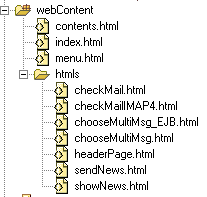
You have to create the following files in the webContent folder:
· contents
· index
· menu
You have to create the following files in the htmls folder:
· checkMail
· checkMailIMAP4
· chooseMultiMsg
· chooseMultiMsg_EJB
· headerPage
· sendNews
· showNews

We assume that you are using the required sources from the JavaMailWeb\webContent and JavaMailWeb\webContent\htmls directories.
For more information about how to create the HTML files, see Creating the HTML files.
Result
You can now see the following:
Result Preview
Next Step
Creating a Reference in the web.xml File.