
 Assigning Users to the J2EE Security
Roles
Assigning Users to the J2EE Security
Roles 
Use
Access to the quick car rental application is now protected with the J2EE security roles AccessQuickCarRental, CarRentalEmployee, and BookingAgent. Therefore, users must be assigned to the appropriate J2EE security roles to have access to the application and perform certain tasks.
In this step, you will assign the users you created in the last step to the corresponding J2EE security roles. The following rules apply:
· Employee and Agent are able to access the application. You will assign these users to the J2EE security role AccessQuickCarRental, which protects access to the JSP.
· Employee is able to view reservations. You will assign this user to the J2EE security role CarRentalEmployee, which protects access to the EJB methods. Users assigned to this role only have access to the methods used for displaying information.
· Agent is able to perform all actions. You will assign this user to the J2EE security role BookingAgent, which also protects access to the EJB methods. Users assigned to this role have access to all of the EJB’s methods.
● OtherUser does not have access to the application.
Prerequisites
|
|
The AS Java is running. |
|
|
You are connected to the AS Java as an administrator using the Visual Administrator. |


Procedure
Assigning the Users to the Role for Access to the JSP
...
1. Using the Security Provider, choose the Policy Configurations tab page.
2. Select the QuickCarRental application from the list of applications.
3. Choose the Security Roles tab page.
The AccessQuickCarRental role appears in the Security Roles section.
See the figure below.

4. Select the AccessQuickCarRental role.
5.
Switch
to edit mode. (Choose  .)
.)
6. In the Mappings / Users section, choose Add.
7. In the dialog that follows, search for the user Agent.
8. Select Agent and choose OK.
9. Repeat steps 5-7 for the user Employee.

Do not assign the user OtherUser to the security role.
The users Agent and Employee are added to the Users section. See the figure below.

Assigning the Users to the Role for Access to the EJB Methods
...
1. Under Components, select the J2EE_QuickCarRentalEjb.jarapplication from the list of applications. (Keep the Security Roles tab page open.)
The BookingAgent and CarRentalEmployee roles appear in the Security Rolessection.
See the figure below.
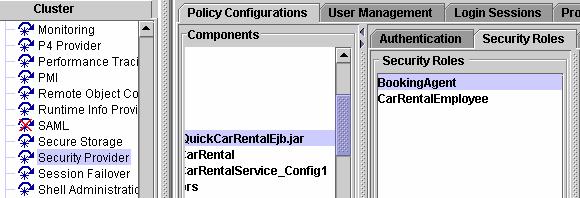
2. Under Security Roles, select the BookingAgent role.
3. In the Mappings / Users section, choose Add.
4. In th dialog that follows, search for the user Agent.
5. Select Agent and choose OK.
The user Agent is added to the Userssection.
6. Select the CarRentalEmployee role.
7. In the Mappings / Users section, choose Add.
8. In the dialog that follows, search for the user Employee.
9. Select Employee and choose OK.
The user Employee is added to the Users section.
Result
Agent and Employee can access the application. Employee can view reservations; Agent can also create and cancel reservations. No other users are allowed to access the application, for example, OtherUser.
Next Step: