Application Maintenance with NWDI
When you use the SAP NetWeaver Development Infrastructure (NWDI) to develop and ship software applications, you also need to develop a maintenance strategy. The following describes how you can use the NWDI to set up a maintenance landscape for multiple releases of an application.

If you already know that you will maintain the application beyond the initial release when you start development, then you must configure the runtime systems in your track landscape accordingly. For example, the production runtime system for the application must be configured in the maintenance track.
Phase 1: Development of Release 1
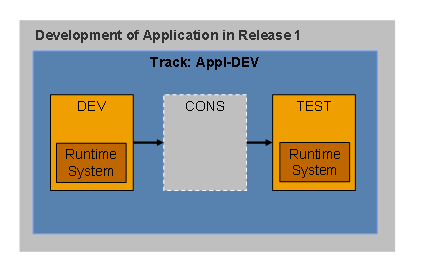
When you develop an application, you generally need only one track, in which you configure the runtime systems for the development system and the test system.
Phase 2: Setting Up a Maintenance Track for Release 1
After the quality assurance team has run acceptance tests, you set up a maintenance track for the first release of the application. This means that you can now start developing the next release in the development track.
You only need the maintenance track if you want to start developing a new release while maintaining an old release.

We recommend that you continue developing new releases in the same development track, and use a copy of the development track as the maintenance track.
Use a copy of the development track as the maintenance track. We recommend that you configure the following runtime systems:
● DEV
● TEST
● PROD
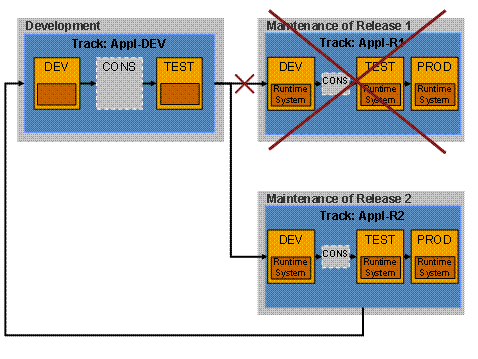
Use a transport connection to connect the maintenance track with the development track; you can then use this connection to supply the maintenance track with the approved development state of the development track.
After you have transported the development state for the first time, delete the track connection, since the application will now be maintained in the DEV system of the maintenance track. Since corrections from the maintenance environment will be copied automatically to the next release, you need a repair connection between the maintenance track and the development track (see also Back Transports in NWDI).
A repair connection is essential if you forward source code files to follow-on tracks from the maintenance tracks. This is because DTR (Design Time Repository) conflicts can occur in the follow-on tracks.

Phase 3: Setting Up a Maintenance Track for Follow-On Releases
In the same way as you did for release 1, you base the maintenance tracks for further releases on the development track.
You can remove any runtime systems that you want to upgrade from release 1 to release 2 from the maintenance track for release 1, and link them to the maintenance track for release 2.
If you want to maintain both releases alongside each other, you need runtime systems for DEV, TEST, and PROD in both maintenance tracks.
If multiple production systems are linked to the maintenance track for release 1 (see production tracks), you can move them to the maintenance track for release 2, one by one. To do this, change the track connections that link to the production tracks. Once no more runtime systems exist for release 1, you can delete the track.