
 Developing JMS Applications
Purpose
The Java Message Service (JMS) is an enterprise messaging system that provides a way for business applications to exchange data without needing to be directly connected to each other. The communication is obtained using messages.
Note that JMS is not a product itself, but a set of predefined interfaces provided in the javax.jms package. The applications use this API to send and receive messages to and from a destination located on the JMS Provider. Java programs that send and/or receive messages using JMS are called JMS clients.
The Java applications can use JMS to send and receive messages using an enterprise messaging server in a standardized, vendor-independent way. The actual messaging product that implements the JMS interfaces is the JMS provider.
The AS Java’s JMS provider is compliant with the JMS specifications versions 1.0.
JMS Object Hierarchy
Some of these objects are administered objects according to the JMS specification. These objects are created and configured using an administration tool.
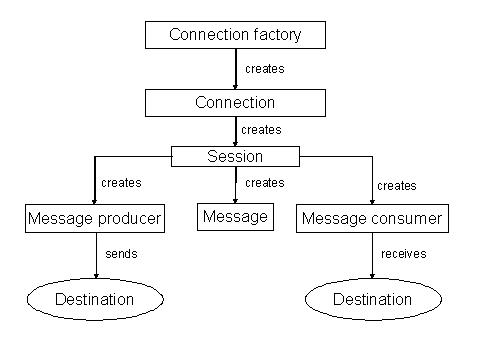
Main JMS Objects
● Connection factory
An administrated object you use to create JMS connections. Connection factories are obtained (looked up) from the JNDI.
● Connection
The connection is a factory for session objects.
● Session
A single-threaded context for sending and receiving messages. Using the session you can create a:
○ Message producer
An object created by the session used to send messages to a destination.
○ Message consumer
An object created by the session used to receive messages sent to a destination.
○ Message
The messages are the actual information exchanged by JMS clients.
● Destinations
The destination is an administered object that encapsulates the identity of a message destination. The destination messaging model could be:
○ Point-to-point (queue destination)
Use it to send messages that only one specified consumer can receive, that is, “one-to-one” message delivery.
○ Publish-subscribe (topic destination)
Use it to send messages to a group of consumers, that is, “one-to-many” message delivery. The model also allows you to create durable subscribers, which enable you to get a message sent to this destination while the consumer was not active.
Destination objects are set up as administered objects and then retrieved by the JMS client at runtime using JNDI instead of being directly instantiated. The JMS Provider also offers you a way to dynamically instantiate temporary destinations.
Implementation Considerations
The JMS enables applications that use one messaging system to exchange messages easily. With the JMS API, you have a standard for writing applications that have to send, receive or exchange asynchronous messages.
The AS Java’s JMS provider is compliant with the JMS specifications versions 1.0.
Major Features
JMS Provider Major Features
Feature |
Description |
JMS 1.0 Compliance |
Full compliance with the JMS 1.0 specification. |
Software High Availability |
Software-based high availability solution. |
JTA Transactions |
Implementation of transactions compliant with the JTA specification. |
XA Transactions |
Implementation of transactions compliant with the XA specification. |
RDBMS Persistence |
Message persistence implemented using a relational database. |
Message pre-fetching |
The feature to pre-fetch JMS messages from the JMS server to a synchronous JMS client. This can improve performance in certain scenarios. |
Message Paging / Swapping |
The feature to swap necessary parts of the messages to a persistent store to free up main memory. This may cause persisting non-persistent messages. |
Multiple Queue Receivers |
The JMS specification does not specify the behavior in case several consumers are registered on one and the same queue. The SAP’s JMS Provider supports multiple queue receivers and the behavior is configurable – round-robin delivery or exception on second receiver. |
Dead Messages Support |
Dead messages are messages that cannot be delivered to the client after a configurable number of attempts. Such messages are moved to a dedicated dead messages queue where an administrator can review them. |
HermesJMS Integration |
Integration with the popular open-source administration and monitoring tool HermesJMS. |
XML Message Export / Import |
The ability to export and/or import JMS messages of a particular destination in XML format. |
JMX Support |
Remote administration and monitoring of the JMS Provider using JMX. |
Security Administration |
The set of features to define, modify and enforce security restrictions to JMS resources and operations. Note that the JMS specification does not define any security aspects of the JMS service. |
See also:
● JMS Overview – for information about how to develop applications using JMS.
 JMS
Administration
JMS
Administration