
 Using a Web Dynpro Component
In the second part of the example application, you enhance the existing view composition by adding an inner view set. A control view and two component interface views are displayed in this view set; to enable a single Web Dynpro component to be used in two instances, two component usages are declared.

For more information about embedding Web Dynpro components, see the tutorial Using Server-Side Eventing in Web Dynpro Components.
The following figure shows a graphical representation of the principle of visual embedding of Web Dynpro components. The image component is displayed using two independent instances. Each instance (component usage) is contained in the view composition using the corresponding component interface view.
For each window in the interior of a Web Dynpro component there is a corresponding component interface view for exterior use. Interface views are used like normal Web Dynpro views to embed Web Dynpro components within view compositions. A component interface view thus represents the abstraction of Web Dynpro components on the view level.
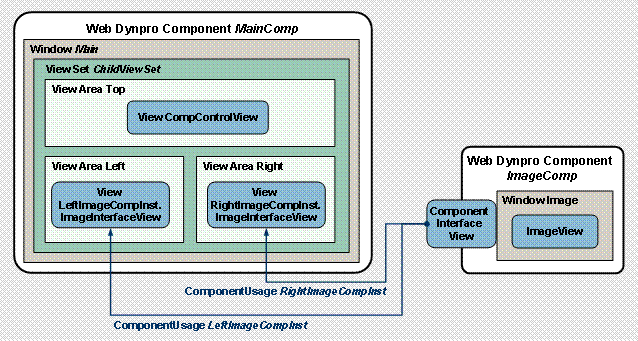
To model more complex view compositions, you have the option of embedding view sets in view areas in the Navigation Modeler. In the following step, you define a second view set called ChildViewSet and embed it in the cell[3,1] view area of the outer view set ParentViewSet. This inner view set is used to model the part of the total view composition that relates to the display and control of the two embedded component interface views.
 Next step: