
 Creating a Dialog Box
You want an address book to appear in a dialog box when you choose To. In this address book, you can select an e-mail address. When you choose Take this address, the dialog box closes and the e-mail address is written in the recipient input field.
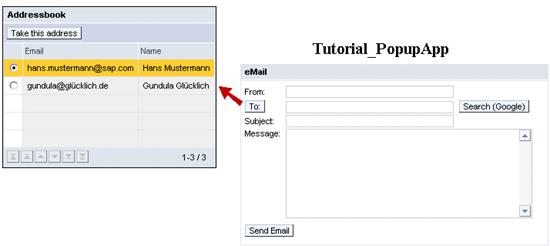
The address book is embedded in a separate Web Dynpro window, which is created and opened when you choose the To pushbutton. To inform the EmailView that an address has been selected, the component controller is used to trigger an event to EmailView, which then closes the AddressbookWindow.


If you no longer need the dialog box, you close it using destroy(). This allows you to reuse the InterfaceView: for example, in another dialog box or in a view in which this InterfaceViewis embedded.
If you use close(), the dialog box is hidden and the InterfaceView is no longer visible. You can reopen the dialog box using open (). However, you cannot embed the InterfaceView in another view or in another dialog box.
The procedure for creating this dialog box is divided into the following steps:
· Create and implement the Web Dynpro window for the address book
¡ Create the Web Dynpro window
¡ Create and embed the Web Dynpro view
¡ Create the context for the address book
¡ Design the layout of the AddressbookView
¡ Implement the controller of the AddressbookView
· Define the interaction of the two Web Dynpro windows EmailWindow and AddressbookWindow
¡ Enhance the context of the EmailView
¡ Create onActionShowAddressbookPopup
¡ Create the event and event handler
¡ Create and implement the action AddressSelected
¡ Implement the event handler
Next step:
Creating and Implementing a Web Dynpro Window for the Address Book