Nodes and Node Elements
Nodes and Node Elements
When a context node is declared at design time, the following properties are defined:
· cardinality: The cardinality of the list of node elements (node collection) that is associated with a node
· selection: The cardinality of the subset of node elements (node selection) that can be selected in this list
· initializeLeadSelection: This property defines whether or not the lead selection of a context node is initialized.
· singleton: The singleton property of a context node defines whether only one node instance is instantiated for child nodes in the context at runtime.
· typedAccessRequired: If this property is assigned the value false, then the Web Dynpro tools do not generate any typed context interfaces for the defined context elements, which results in slimmer controller classes that consume less memory. The context of a Web Dynpro controller can only be accessed using the generic context API.
In addition to the properties that directly affect the node, the context elements (context nodes and attributes) define the type of associated node element directly below a node. A data type must also be assigned to the context attributes.
The root node of a controller context has predefined properties (cardinality=1..1, singleton=true), which cannot be changed. You can only add nodes and attributes.
Example
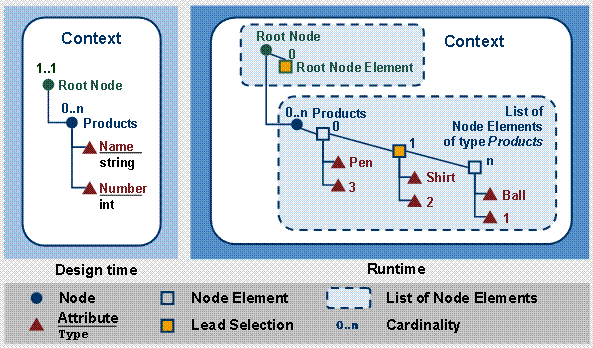
This relationship is demonstrated in the following figure:
|
Several product
data records should be listed in a table. The data records should be saved in
the view controller context and are displayed in the table using data binding.
A product is easily identified using the two properties Name and
Number, whose values are displayed in the table columns Name and Number. In the controller context, the type of such a
product data element is defined by defining a context node called products
containing two context attributes called Name of type string and Number of type integer. |