
 Implementing Form View Controller and
Interface Controller
Implementing Form View Controller and
Interface Controller 
Prerequisites
|
|
You have created the SendButtonPressed action for the Form view. |
|
|
You have declared the usage of the component interface controller in the Form view controller. |
|
|
You have defined the InnerEvent event in the component interface controller. |
|
|
You have built the view context for the Form view. |
|
|
The structure of your project WebDynpro_Eventing is currently displayed in the Web Dynpro Explorer. |

Procedure
Before designing the view layout, you declared the method definition, the controller usage, and the data binding; now you must implement the controller of the Form view and the Internal component interface.
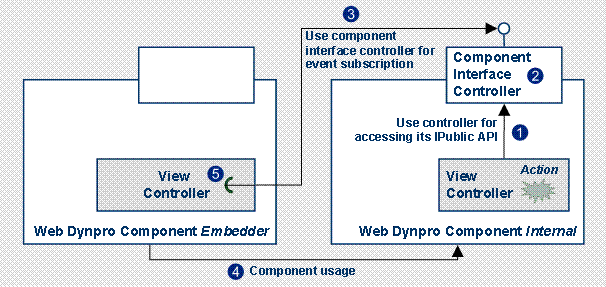
The mechanism used in the example application for triggering events across the borders of Web Dynpro components is shown in the figure below:
|
(1) |
In the Form view controller, in the event handler of the SendButtonPressed action, the public method fireEvent of the component interface controller is called. For this, a corresponding usage relation between the controllers must be defined. |
|
(2) |
In the component interface controller, the public method fireEvent calls the internal method wdThis.wdFireEventInnerEvent(text) for triggering the event InnerEvent defined there. Events cannot be triggered from the outside directly via the Ipublic API of a controller. |
|
(3) |
In the embedding component Embedder, a component usage relation with the used component Internal is defined. |
|
(4) |
In the view controller of the embedding Web Dynpro component, the usage of the component interface controller of the inner Web Dynpro component must be defined. |
|
(5) |
Then a method of the view controller in the embedding component can subscribe to the event InnerEvent of the inner component ito be able to react to the event triggered in 2 at runtime. Events can pass parameter values to their recipients. |
...
Implementing an Action Event Handler in the Form View Controller
In the action event handler onActionSendButtonPressed(), you must call the method fireEvent of the component interface controller, based on the parameter value entered by the user (stored in the context).
...
1. Switch to the Implementation perspectives view of the Form view controller.
2. In the onActionSendButtonPressed() method, enter the following source code:
//@@begin javadoc:onActionSendButtonPressed(ServerEvent) /** declared validating event handler */ //@@end public void onActionSendButtonPressed( com.sap.tc.webdynpro.progmodel.api.IWDCustomEvent wdEvent ) { //@@begin onActionSendButtonPressed(ServerEvent) String text = wdContext.currentContextElement().getText(); wdThis.wdGetInternalInterfaceController().fireEvent(text); //@@end } |
Implementing the fireEvent Method in the Internal Component Interface Controller
...
1. Switch to the Implementation perspectives view of the component interface controller of the Web Dynpro component Internal.
2. In the fireEvent() method, add the following source code:
//@@begin javadoc:fireEvent() /** declared method */ //@@end public void fireEvent( java.lang.String text ) { //@@begin fireEvent() wdThis.wdFireEventInnerEvent(text); //@@end } |
Result
After completing the implementation of triggering an event in the Internal Web Dynpro controller, the next section deals with the embedding Web Dynpro component Embedder, which must react to this event.
 The next step is Developing the
Embedder Web Dynpro Component.
The next step is Developing the
Embedder Web Dynpro Component.