
 Generic Validation Service
The above description represent the best-case scenario and does not take the generic error handling features provided by the Web Dynpro runtime framework into account. There are many situations where executing an action event handler is not desirable in case the end user has entered invalid data.
Typical Error Behavior for a Save Action
Imagine the Web Dynpro model behind the following Web Dynpro UI:

The input field Date of birth is of the type date. When the Save button is pressed, the associated action event handler is only to be called if the user has entered valid data. Entering any invalid data like MyBirthday should inhibit the execution of the event handler and display an error message to the end user. After correcting the invalid data, the user can press the Save button again. The Web Dynpro runtime framework automates this behavior (generic validation service). If the end user enters invalid data, the execution of the action event handler is blocked.
Typical Error Behavior for a Change Action
As an alternative, imagine the model behind this Web Dynpro UI:


The end user expects a change in the marital status to enable or disable the input field for married since, which is bound to a context attribute of the type date. An action event handler that is bound to the onSelect event of a RadioButtonGroupByKey UI element can easily implement this behavior. The action event handler simply disables the input field by writing true or false to a context attribute, which is bound to the input field’s enabled property.
Action event handler in view controller FormView.java |
public void onActionIsMarriedChanged( com.sap.tc.webdynpro.progmodel.api.IWDCustomEvent wdEvent, String isMarried) { //@@begin onActiononMarriedChanged(ServerEvent) wdContext.currentContextElement() .setMarriedSinceEnabled(isMarried.equals("IsMarried_Key"))); //@@end } |
Parameter Mapping
How does the action event handler onActionIsMarriedChanged() receive the parameter value isMarried of the type String? The answer is based on parameter mapping.
Parameter mapping implementation in view controller FormView.java |
public static void wdDoModifyView(IPrivateFormView wdThis, IPrivateFormView.IContextNode wdContext, com.sap.tc.webdynpro.progmodel.api.IWDView view, boolean firstTime) { //@@begin wdDoModifyView if (firstTime) { // Access UI element with id “IsMarriedRadioButtonGroupByKey” IWDRadioButtonGroupByKey theRadioButtons = (IWDRadioButtonGroupByKey) view.getElement("IsMarriedRadioButtonGroupByKey");
// Map event parameter 'key' to parameter 'isMarried' in action // event handler. theRadioButtons.mappingOfOnSelect() .addSourceMapping("key","isMarried"); } //@@end } |
The parameter mapping between the UI element event and the action event handler is implemented in the view controller’s wdDoModifyView() method. By calling the API method IWDParameterMapping.addSourceMapping(), the UI element event parameter key is mapped onto the isMarried parameter of the action event handler.
In addition, the parameter isMarried of the type String has to be declared for the action IsMarriedChanged as well as for its action event handler onActionIsMarriedChanged() (see figure below).
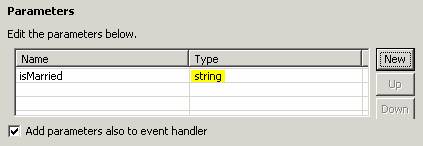
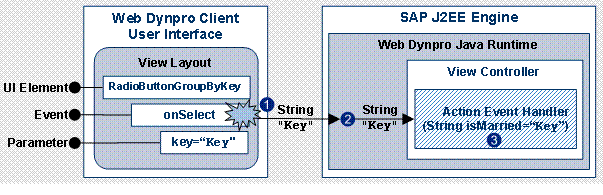
At runtime, the parameter mapping is carried out as follows (see next figure). When a radio button in the RadioButtonGroupByKey UI element is selected, an onSelect event is fired and the key parameter value of the selected item is sent to the server (1). This key parameter value is stored in the context attribute to which the RadioButtonGroupByKey UI element is bound. The key value is then read by the Web Dynpro Java runtime (2). On the basis of the parameter mapping information, the Web Dynpro Java runtime matches UI event parameters (key) with action event handler parameters (isMarried). Finally, the action event handler is invoked using the key parameter value of the RadioButtonGroupByKey UI element based on the given parameter mapping information (3).
Entering Invalid Data
Now, what happens if somebody enters invalid data?

As shown in the previous figure, the result is not what the end user would expect. Changing the marital status to not married results in a UI element event for the radio button. However, since the input for married since is not valid, the action event handler is not executed and thus the code for disabling the input field does not run.
Next Section:
Non-Validating and Validating Actions