
 Authentication Between the Components Using
Logon Tickets
Authentication Between the Components Using
Logon Tickets 
Purpose
To pass a user’s authentication information (user ID) to further services or components, Web Dynpro uses the logon ticket mechanism. After a user has been authenticated on the server, he or she receives a logon ticket that is used for further access (for example, on the Web service and in the backend).
Prerequisites
· The Web Dynpro is set up to require authentication.
· The Web service requires authentication and accepts logon tickets.
· A destination for the application exists in the Destination service on the AS Java. The destination is also configured to accept logon tickets.
Process Flow
Web Dynpro passes the user’s logon ticket, which is stored in the user’s context for the Web Dynpro, to the Web service. To obtain this logon ticket from the user context, the Web Dynpro’s Web service model uses the Destination service. The Destination service retrieves the logon ticket and sets it in an HTTP header that is sent with the request to the Web service.
See the figure below:
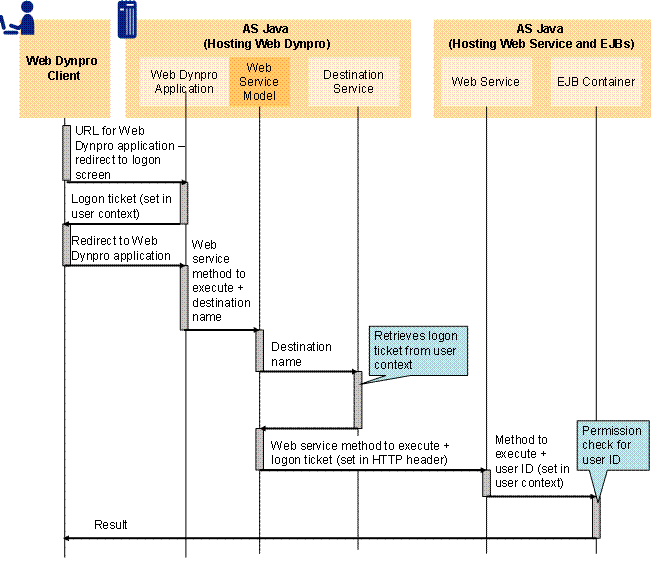
The process flow is as follows:
...
1. The user calls the Web Dynpro application and is authenticated.
2. The AS Java that hosts the Web Dynpro application issues the user a logon ticket, which is set in the user’s context for the Web Dynpro application.
3. The user is redirected to the Web Dynpro application.
4. The Web Dynpro’s Web service model retrieves the user’s logon ticket from the user’s context using the Destination service.
5. The Web service model sets the logon ticket in an HTTP header and calls the Web service method.
6. The Web service obtains the logon ticket from the HTTP header and sets the corresponding user ID in the user context in the backend so that it can be obtained by the EJB.
7. The EJB processes can now process the permission check using this user ID.
Result
The user is authenticated and the user ID exists in the backend context.