
 Including the UME
JAR File in the Web Dynpro Project
Including the UME
JAR File in the Web Dynpro Project 
Use
To be able to include the hasPermission() check in the Web Dynpro client, you must first include the JAR file com.sap.security.api.jar in the build path in the Developer Studio. This archive contains the various UME interfaces, to include the IUser interface, which provides the hasPermission() method.
Prerequisites
|
|
The Web Dynpro perspective is displayed in the SAP NetWeaver Developer Studio. |
|
|
The Web Dynpro car rental project is displayed in the Web Dynpro Explorer. |


Procedure
...
1. Select the TutWD_CarRental project, open the context menu and choose Properties.
The Properties for TutWD_CarRental dialog appears.
2. In the left pane, select Java Build Path.
In the right pane, the tab pages for the source files, projects, libraries and the order and export files appear.
3. Select the Libraries tab page.
4. Select Add Variable...
5. Select the WD_RUNTIME variable. See the figure below.

6. Choose Extend...
The Variable Extensions dialog appears.
7. Expand com.sap.security_2.0.0 ® lib.
8. Select com.sap.security.api.jar and choose OK. See the figure below.
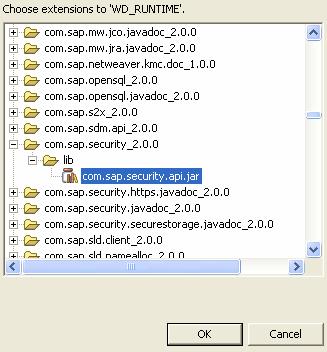
The library is added to the Java build path.
9. Choose OK.
Result
The Java build path for the Web Dynpro project is extended to include this JAR file. The UME IUser interface, which provides the hasPermission() method, can therefore be accessed by the Web Dynpro project.
Next Step:
Creating the Permission Class for the Web Dynpro