
 Constructing a Recursive and
Loadable Web Dynpro Tree
Constructing a Recursive and
Loadable Web Dynpro Tree 
In the following tutorial, you construct a Web Dynpro tree that only loads its data when the user expands a node of the tree.

You can download the Web Dynpro project for the current tutorial from the Software Developer Network SDN (http://sdn.sap.com -> Web Application Server -> Web Dynpro -> Sample Applications and Tutorials) in two versions: one skeleton version you can use for exercises and one final version (solution) for an immediate build, deployment and run on the Java engine of the SAP Web Application Server.
Task
This tutorial shows you how to use a performance-efficient recursive Web Dynpro tree. For that purpose, you will insert the tree interface-element in a view. Furthermore, you will implement the controller of the view in such a way, that only when the user expands a node, the direct sub-nodes and sub-elements of the node are added.
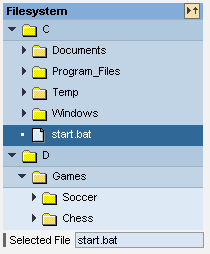
In this tutorial, you simulate a file structure that is to be displayed in the form of a tree. A Web Dynpro tree represents the exact structure as it exists in the context of the view at runtime. Since it is impossible to know how many subfolders the file structure has, the context must be constructed recursively. The recursive structure has the advantage that any number of subfolders can exist at runtime.
You also implement the selection of an entry from the tree-interface element. In this tutorial, you want to display the text of the selected entry in an input field.
You want the user interface of this Web application to have only one view. This view consists of a tree-interface element, a label, and an input field for displaying the selected element. Initially, you want a node of the tree-interface element to be selected and expanded.
Objectives
When you have completed the described procedure, you will be able to:
|
! |
Use a context recursively |
|
! |
Implement a Web Dynpro tree that loads data |
|
! |
Implement an event handler that can react to the selection of a node of the tree. |
Prerequisites
Systems, Installations, and Authorizations
· The SAP NetWeaver Developer Studio is installed on your PC.
· You have access to the SAP J2EE Engine.
Knowledge
· Java programming language
· Basic knowledge of programming of Web Dynpro applications
Next Step: