
 Sample Application
This section is based on a Web Dynpro sample application which is available on the SAP Developer Network (SDN) at http://sdn.sap.com. The project is available for download in a corresponding zip file under the category Home g Developer Areas g Web Application Server g Web Dynpro g Sample Applications and Tutorials.
Prererequisites
· The sample application is based on a SAP NetWeaver 04 – Support Package Stack 11 installation
Importing the Project
...
1. Call the SAP NetWeaver Developer Network (SDN) by using the URL http://sdn.sap.com and log on with your user ID and password. If you do not have a user ID, you must register before you can proceed.
2. Download the zip file WDActions.zip containing the Web Dynpro project WD_Actions and save the zip file to any directory on your local hard disk or directly in the work area of the SAP NetWeaver Developer Studio.
3. Extract the content of the zip file WDActions.zip in the work area of the SAP NetWeaver Developer Studio or in any directory on your local hard disk.
4. Open the SAP NetWeaver Developer Studio.
5. Import the Web Dynpro project WD_Actions:
a. In the menu, choose File g Import.
b. In the next window, choose Existing Project into Workspace and choose Next to confirm.
c. Choose Browse, open the folder in which you saved the project WD_Actions and select the project.
d. Choose Finish to confirm.
The Web Dynpro project WD_Actions appears in the Web Dynpro Explorer for further processing and completion of the tutorial.
Web Dynpro Project Structure
The sample application is based on the following project structure:
· Web Dynpro Project name: WD_Actions
· Web Dynpro Application: ActionsApp
· Web Dynpro Component: ActionsComp
¡ Web Dynpro View: FormView
§
Context: The view context contains a context node with
cardinality 1..1, which is bound to the dictionary structure Person. Most fields of this structure are
typed using the defined dictionary simple types.
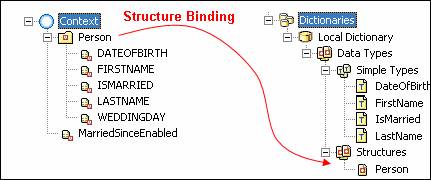
The value attribute MarriedSinceEnabled of the type boolean is used for enabling or
disabling the corresponding input field using data binding.
§ Non-Validating Action: IsMarriedChanged with parameter isMarried of type String
§ Validating Action: Save
§ Methods: Event handlers onActionIsMarriedChanged() with parameter isMarried of type Stringand onActionSave()
§
Message Pool: Two error messages with keys NMS (no marital status set) and
NME (no date entered in field married since)

· Local Java Dictionary:
¡
Simple Types: DateOfBirth, FirstName,
IsMarried, and LastName
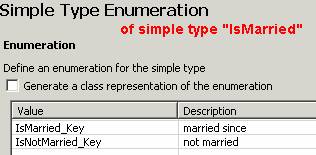
¡
Structure Types: Person
