
 Creating the Users
Use
The quick car rental application is now protected using authentication and UME permissions. To access the application and the various methods, users must be assigned to the appropriate roles. In the next steps, you will act as the administrator to set up the users and corresponding role assignments.
In the first of the administrative steps, you will create the following users:
· Employee (car rental employee)
· Agent (standard booking agent)
· Pr_Agent (premium booking agent)
· OtherUser (another user with no authorization to use the application)
You will later assign the UME roles to these users.

If these users already exist on the server, then you can omit this step.
Prerequisites
|
|
The AS Java is running. |
|
|
You have a user ID with administrator rights, for example, Administrator. |


Procedure
...
1. Start the UME user administration console.

http://localhost:50000/useradmin
2. Log on as your administrator user.
The Identity Management screen appears.
3. For each of the users that you need to create:
a. Choose Create User.
b. Enter the data for the user.
See the example below for the user Pr_Agent:
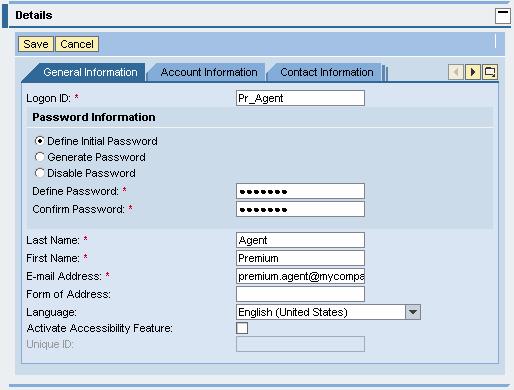
c. Save the user.
4. Repeat for the other users.
Next Step: