
 Determining the Content and Interaction of
Views
Determining the Content and Interaction of
Views 
...
In this example, the user interface is to consist of four views:

· Welcome: Display a message when starting or ending the application (“welcome” and “goodbye” messages). Start or exit the quiz.
· Question: Display a quiz question from which you can navigate to the next question or display the corresponding answer.
· QuestionMark: This area is used to display an unanswered question.
· Answer: Display answer for current quiz question. Possibility of ending the quiz by moving on to the “goodbye” message in the Welcome view.
In a Web Dynpro application, the views contain the actual user interface elements. The following graphic shows how to reach the individual views and specifies the basic navigation structure.
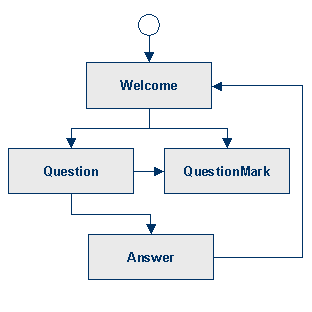
Layout of the Web Dynpro Window
A Web Dynpro component is represented visually by a Web Dynpro window. For external users, it is represented visually by the component interface view. In turn, a Web Dynpro window is logical container for views. The views can be combined using a view set, which contains special view areas that are used to include individual views.
The developer can choose from different view set types that enable the implementation of different geometric arrangements of the view areas. A commonly used view set definition is the T Layout. A T Layout view set consists of three view areas of which two are placed adjacently below the first view area:

 In the next step, continue by defining a view
composition.
In the next step, continue by defining a view
composition.