
 Setting Classpath and Compiling
Sources
Setting Classpath and Compiling
Sources 
Use
In this step you set the classpath and compile the project.
Procedure
...
...
1. Open the project context menu and select Properties.
2. In the Properties for JavaMail dialog that appears select Java Build Path. Choose the Libraries sub tab.
3. Choose Add Variable…
4. Select the TSSAP_JAVAX_HOME variable and choose Extend...
5. Expand the lib folder and choose the required extension activation.jar. Choose OK.
Dialog Preview
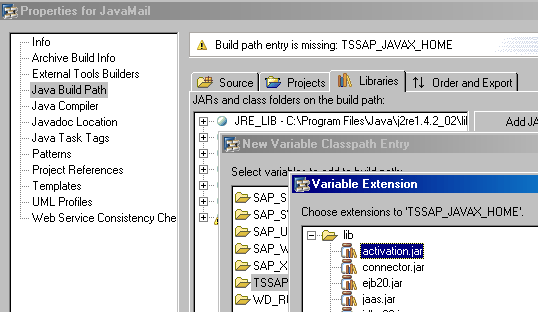
6. Again select Add Variable…
7. Perform the same operation for the mail.jar extension.
8. Choose OK.
The package is automatically compiled.

The objects in the SAP NetWeaver Developer Studio are automatically compiled when they are saved. To do this, choose File ® Save all.
Result
The classpath is set and the project is compiled.
Next Step
Creating References in the ejb-jar.xml File